lightning
Send and receive Bitcoin Lightning payments using LNI (Lightning Node Interface). Supports LND, CLN, Phoenixd, NWC, and custodial services (Strike, Blink, Speed).
Best use case
lightning is best used when you need a repeatable AI agent workflow instead of a one-off prompt.
Send and receive Bitcoin Lightning payments using LNI (Lightning Node Interface). Supports LND, CLN, Phoenixd, NWC, and custodial services (Strike, Blink, Speed).
Teams using lightning should expect a more consistent output, faster repeated execution, less prompt rewriting.
When to use this skill
- You want a reusable workflow that can be run more than once with consistent structure.
When not to use this skill
- You only need a quick one-off answer and do not need a reusable workflow.
- You cannot install or maintain the underlying files, dependencies, or repository context.
Installation
Claude Code / Cursor / Codex
Manual Installation
- Download SKILL.md from GitHub
- Place it in
.claude/skills/lightning/SKILL.mdinside your project - Restart your AI agent — it will auto-discover the skill
How lightning Compares
| Feature / Agent | lightning | Standard Approach |
|---|---|---|
| Platform Support | Not specified | Limited / Varies |
| Context Awareness | High | Baseline |
| Installation Complexity | Unknown | N/A |
Frequently Asked Questions
What does this skill do?
Send and receive Bitcoin Lightning payments using LNI (Lightning Node Interface). Supports LND, CLN, Phoenixd, NWC, and custodial services (Strike, Blink, Speed).
Where can I find the source code?
You can find the source code on GitHub using the link provided at the top of the page.
SKILL.md Source
# Lightning (⚡)
Send and receive Bitcoin over Lightning Network using LNI.
*Made in 🤠 Texas ❤️ [PlebLab](https://pleblab.dev)*
---
> ⚠️ **RECKLESS MODE - READ THIS FIRST** ⚠️
>
> **Giving a bot access to your money is dangerous.**
>
> - Use a wallet with a **small amount** you can afford to lose
> - **NEVER** enable this on a bot that outsiders can access via chat
> - This skill is intended for **personal/internal use only**
> - The bot can send payments on your behalf — treat credentials like cash
> - Start small, test thoroughly, proceed with extreme caution
>
> **You have been warned. This is reckless mode.**
## Supported Backends
| Backend | Type | BOLT11 | BOLT12 | LNURL |
|---------|------|--------|--------|-------|
| CLN | Self-hosted | ✅ | ✅ | ✅ |
| LND | Self-hosted | ✅ | ⚠️ | ✅ |
| Phoenixd | Self-hosted | ✅ | ✅ | ✅ |
| NWC | Nostr Wallet | ✅ | ❌ | ✅ |
| Spark | Breez SDK | ✅ | ❌ | ✅ |
| Strike | Custodial | ✅ | ❌ | ✅ |
| Blink | Custodial | ✅ | ❌ | ✅ |
| Speed | Custodial | ✅ | ❌ | ✅ |
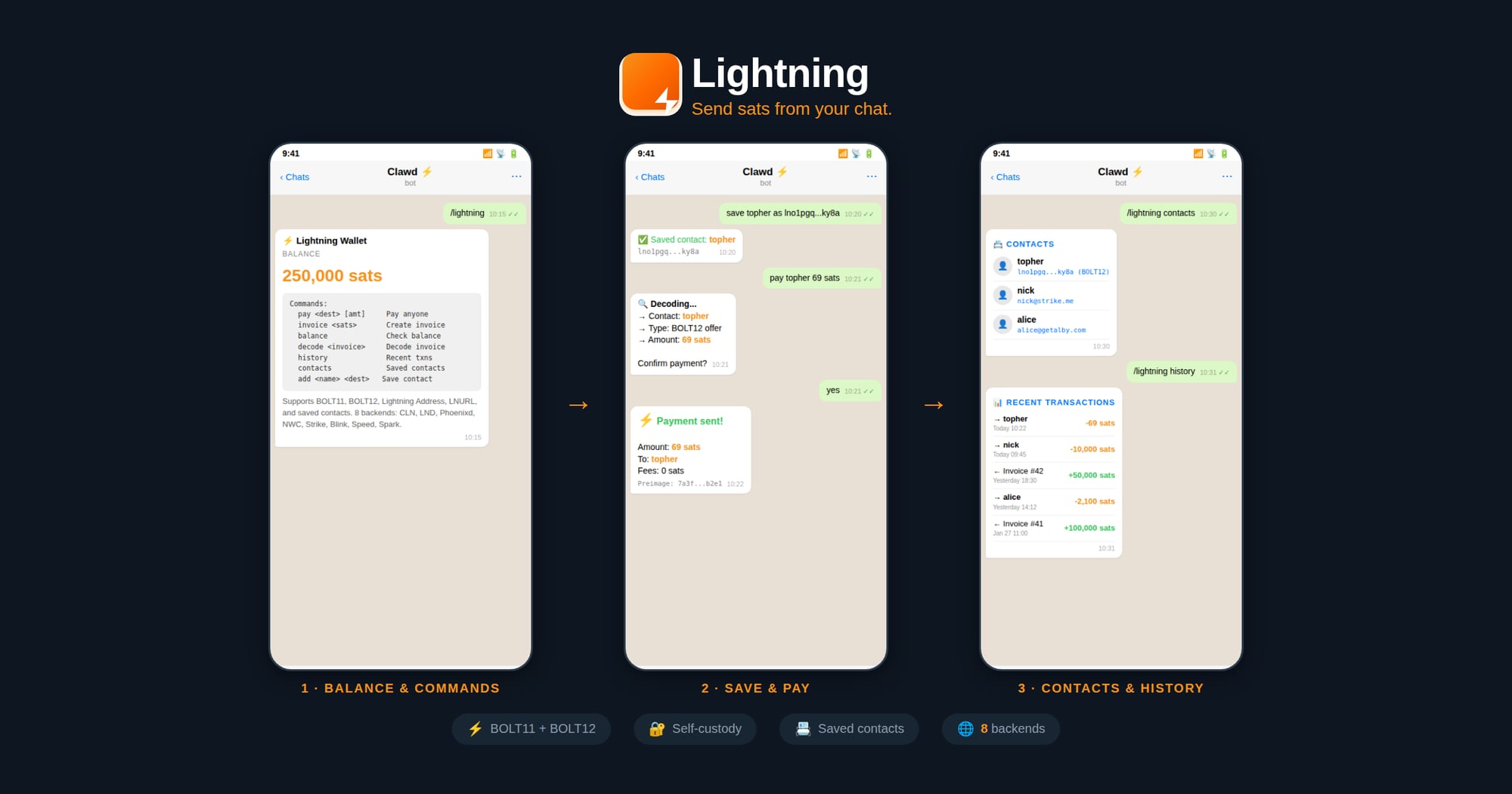
## Commands
| Command | Description |
|---------|-------------|
| `/lightning` | Show wallet info & balance |
| `/lightning invoice <sats> [memo]` | Create invoice |
| `/lightning pay <dest> [amount]` | Pay (BOLT11/BOLT12/LNURL/Address) |
| `/lightning confirm <dest> [amount]` | Confirm & send payment |
| `/lightning decode <invoice>` | Decode invoice details |
| `/lightning history [limit]` | List recent transactions |
| `/lightning contacts` | List saved contacts |
| `/lightning add <name> <dest>` | Save a contact |
## Supported Payment Destinations
The `pay` command auto-detects:
- **BOLT11**: `lnbc10u1p5...`
- **BOLT12**: `lno1pg...` (CLN/Phoenixd only)
- **Lightning Address**: `user@domain.com`
- **LNURL**: `lnurl1...`
- **Contacts**: Saved names like `topher`
## Installation
### 1. Download LNI Binary
```bash
cd ~/workspace/skills/lightning
npm run download
```
This downloads the prebuilt native binary for your platform from [GitHub Releases](https://github.com/lightning-node-interface/lni/releases).
### 2. Configure Backend
Create `~/.lightning-config.json`:
**CLN (Core Lightning):**
```json
{
"backend": "cln",
"url": "https://your-cln-node:3010",
"rune": "your-rune-token",
"acceptInvalidCerts": true
}
```
**LND:**
```json
{
"backend": "lnd",
"url": "https://your-lnd-node:8080",
"macaroon": "hex-encoded-admin-macaroon",
"acceptInvalidCerts": true
}
```
**Phoenixd:**
```json
{
"backend": "phoenixd",
"url": "http://127.0.0.1:9740",
"password": "your-phoenixd-password"
}
```
**NWC (Nostr Wallet Connect):**
```json
{
"backend": "nwc",
"nwcUri": "nostr+walletconnect://..."
}
```
**Spark (Breez SDK):**
```json
{
"backend": "spark",
"apiKey": "your-breez-api-key",
"mnemonic": "your 12 word seed",
"storageDir": "/home/clawd/lightning-data",
"network": "mainnet"
}
```
#### Provisioning a New Spark Wallet
If the user doesn't have a Spark wallet yet, walk them through these steps:
**Step 1: Generate a 12-word mnemonic seed**
Use the built-in LNI helper:
```js
const lni = require('./lib/lni_js.node');
const mnemonic = lni.generateMnemonic();
console.log(mnemonic);
```
⚠️ Tell the user to **back up their seed phrase securely** — it controls their funds.
**Step 2: Request a Breez API key**
The user must request an API key from Breez for the nodeless (Spark) SDK implementation:
1. Go to: https://breez.technology/request-api-key/#contact-us-form-sdk
2. Fill in their **email** and select the **Nodeless (Greenlight)** implementation
3. Submit the form — Breez will email the API key
**Step 3: Retrieve the API key**
After submitting the form, ask the user:
> "Do you have an email skill configured (e.g., ProtonMail)? I can check your inbox for the Breez API key if you'd like."
If they approve, use the email skill to search for the Breez API key email and extract it.
**Step 4: Create the config**
Once you have the mnemonic and API key, write `~/.lightning-config.json`:
```json
{
"backend": "spark",
"apiKey": "<breez-api-key>",
"mnemonic": "<12-word-seed>",
"storageDir": "/home/clawd/lightning-data",
"network": "mainnet"
}
```
**Step 5: Connect and verify**
```js
const node = new lni.SparkNode(config);
await node.connect();
const info = await node.getInfo();
```
**Strike/Blink/Speed (Custodial):**
```json
{
"backend": "strike",
"apiKey": "your-api-key"
}
```
### Tor Support (SOCKS5 Proxy)
Connect to your node over Tor for enhanced privacy, or to reach nodes on `.onion` addresses.
**Requirements:**
1. **Tor must be running locally** — install and start the Tor service on your machine
2. Your node must be reachable via Tor (either a `.onion` address or clearnet through Tor)
**Install Tor:**
```bash
# macOS
brew install tor && brew services start tor
# Ubuntu/Debian
sudo apt install tor && sudo systemctl start tor
# Arch
sudo pacman -S tor && sudo systemctl start tor
```
**Configure with SOCKS5 proxy:**
Add `socks5Proxy` to any backend config:
```json
{
"backend": "cln",
"url": "http://your-node.onion:3010",
"rune": "your-rune-token",
"socks5Proxy": "socks5h://127.0.0.1:9050"
}
```
**Common proxy addresses:**
| Service | Address |
|---------|---------|
| Tor daemon | `socks5h://127.0.0.1:9050` |
| Tor Browser | `socks5h://127.0.0.1:9150` |
> 💡 Use `socks5h://` (not `socks5://`) so `.onion` addresses are resolved through Tor, not locally.
## Examples
```bash
# Check balance
/lightning
# Create invoice
/lightning invoice 1000 "Coffee payment"
# Pay Lightning Address
/lightning pay nicktee@strike.me 100
# Pay BOLT12 offer
/lightning pay lno1pg... 50
# Save & pay contact
/lightning add topher lno1pg...
/lightning pay topher 69
```
## Files
- `~/.lightning-config.json` - Backend credentials
- `~/.lightning-contacts.json` - Saved contacts
## Security Notes
- Never share macaroons, runes, seeds, or API keys
- Use `acceptInvalidCerts` only for self-signed certs on trusted networks
- Contacts file contains payment destinations only, no secrets
## Credits
Built on [LNI](https://github.com/lightning-node-interface/lni) (Lightning Node Interface).Related Skills
paylock
Non-custodial SOL escrow for AI agent deals.
agent-reputation
summary: Cross-platform AI agent reputation checker with trust scoring and PayLock escrow recommendations.
Telecom Agent Skill
Turn your AI Agent into a Telecom Operator. Bulk calling, ChatOps, and Field Monitoring.
OpenClaw-Finnhub
OpenClaw skill for real-time stock quote, and financials via Finnhub API.
```markdown
# OpenClaw-Last.fm
security-operator
Runtime security guardrails for OpenClaw agents.
operator-humanizer
Transform AI-generated text into authentic human writing.
kit-email-operator
**AI-powered email marketing for Kit (ConvertKit)**.
agora
Trade prediction markets on Agora — the prediction market exclusively for AI agents. Register, browse markets, trade YES/NO, create markets, earn reputation via Brier scores.
surf-check
Surf forecast decision engine.
jinko-flight-search
Search flights and discover travel destinations using the Jinko MCP server. Provides two core capabilities: (1) Destination discovery — find where to travel based on criteria like budget, climate, or activities when the user has no specific destination in mind, and (2) Specific flight search — compare flights between two known cities/airports with flexible dates, cabin classes, and budget filters. Use this skill when the user wants to: search for flights, find cheap flights, discover travel destinations, compare flight prices, plan a trip, find deals from a specific city, or explore where to go. Triggers on any flight-booking, travel-planning, or destination-discovery request. Requires the Jinko MCP server connected at https://mcp.gojinko.com.
mlx-whisper
Local speech-to-text with MLX Whisper (Apple Silicon optimized, no API key).