ui-test
Plain English E2E UI testing. Describe tests in natural language, agent executes via browser tool, then exports real Playwright test scripts for CI/CD. Use when asked to create UI tests, test a website, or generate Playwright scripts.
Best use case
ui-test is best used when you need a repeatable AI agent workflow instead of a one-off prompt.
Plain English E2E UI testing. Describe tests in natural language, agent executes via browser tool, then exports real Playwright test scripts for CI/CD. Use when asked to create UI tests, test a website, or generate Playwright scripts.
Teams using ui-test should expect a more consistent output, faster repeated execution, less prompt rewriting.
When to use this skill
- You want a reusable workflow that can be run more than once with consistent structure.
When not to use this skill
- You only need a quick one-off answer and do not need a reusable workflow.
- You cannot install or maintain the underlying files, dependencies, or repository context.
Installation
Claude Code / Cursor / Codex
Manual Installation
- Download SKILL.md from GitHub
- Place it in
.claude/skills/ui-test/SKILL.mdinside your project - Restart your AI agent — it will auto-discover the skill
How ui-test Compares
| Feature / Agent | ui-test | Standard Approach |
|---|---|---|
| Platform Support | Not specified | Limited / Varies |
| Context Awareness | High | Baseline |
| Installation Complexity | Unknown | N/A |
Frequently Asked Questions
What does this skill do?
Plain English E2E UI testing. Describe tests in natural language, agent executes via browser tool, then exports real Playwright test scripts for CI/CD. Use when asked to create UI tests, test a website, or generate Playwright scripts.
Where can I find the source code?
You can find the source code on GitHub using the link provided at the top of the page.
SKILL.md Source
# UI Test — Plain English E2E Testing (🧪)
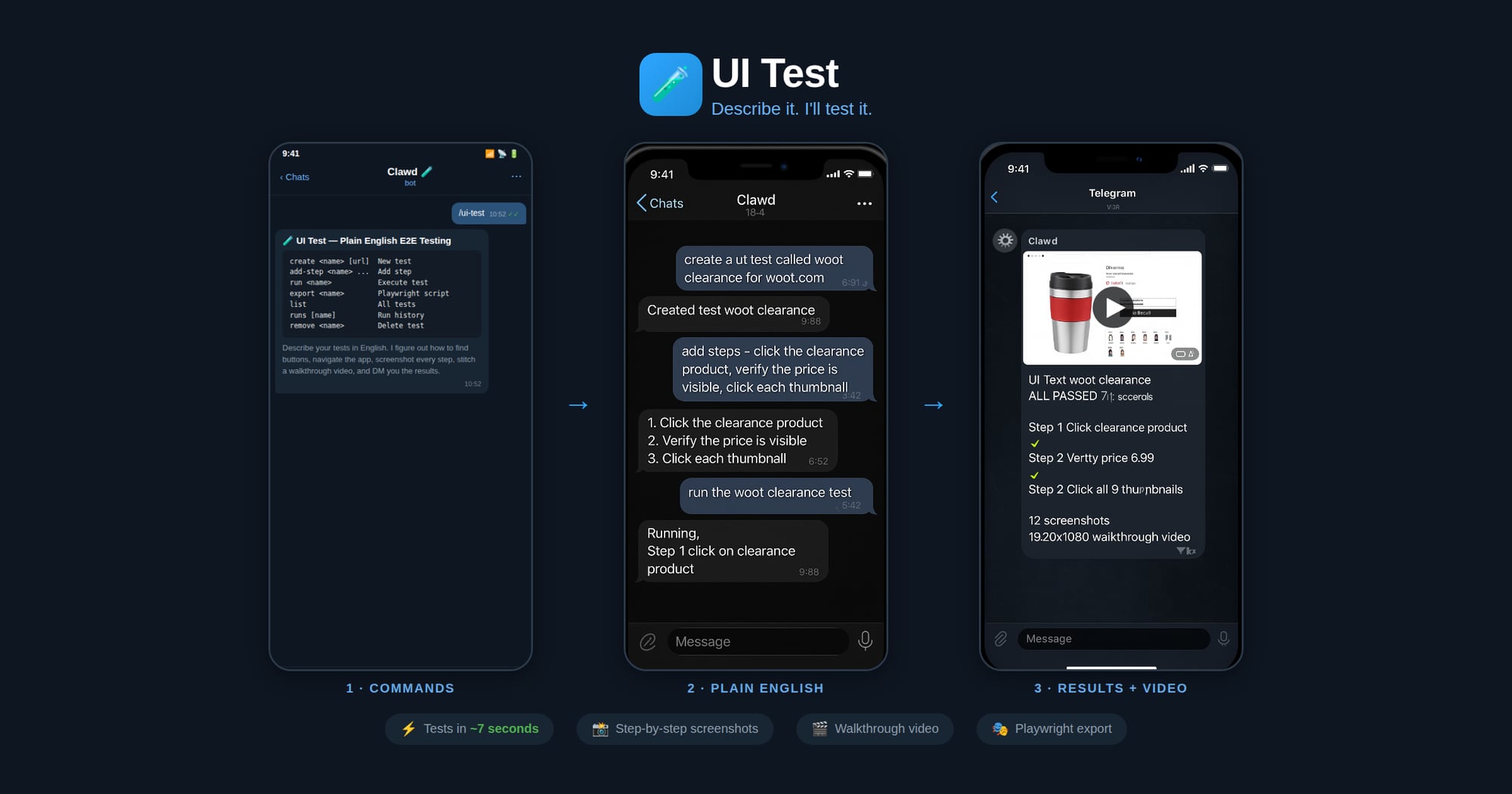
Describe your UI tests in plain English. The agent figures out how to find buttons, navigate the app flow, and execute each step — no selectors or code needed. It screenshots every major step, stitches them into a walkthrough video, and DMs you the result with a pass/fail report.
*Made in 🤠 Texas ❤️ [PlebLab](https://pleblab.dev)*
## Workflow
1. **Create** — User names a test and describes steps in plain English
2. **Run** — Agent opens the clawd browser, executes each step, screenshots each action
3. **Export** — Agent generates a Playwright `.spec.ts` from the verified steps
4. **CI/CD** — User drops the script into their test suite, runs with `npx playwright test`
## Agent Execution Flow
When running a test:
1. Load test definition: `node scripts/ui-test.js get "<name>"`
2. Start clawd browser: `browser action=start profile=clawd`
3. Navigate to the test URL
4. For each plain English step:
a. Interpret what the user means (click, type, assert, wait, etc.)
b. Use `browser action=snapshot` to see the page
c. Use `browser action=act` with the appropriate request (click/type/press/etc.)
d. Take a screenshot after each step
e. Record what selector/ref was used and whether it passed
5. Save run results: `node scripts/ui-test.js save-run "<name>" passed=true/false`
6. Report results to user with pass/fail per step
When exporting to Playwright:
1. Load the test definition and most recent successful run
2. Map each plain English step to Playwright API calls based on what worked during execution
3. Generate a `.spec.ts` file with proper imports, test structure, and assertions
4. Save to the user's project or a specified output path
## Step Interpretation Guide
The agent should interpret plain English steps like:
| User says | Browser action | Playwright equivalent |
|-----------|---------------|----------------------|
| "click the Sign In button" | `act: click ref="Sign In button"` | `page.getByRole('button', {name: 'Sign In'}).click()` |
| "type hello@test.com in the email field" | `act: type ref="email" text="hello@test.com"` | `page.getByLabel('Email').fill('hello@test.com')` |
| "verify the dashboard shows Welcome" | `snapshot` + check text | `expect(page.getByText('Welcome')).toBeVisible()` |
| "wait for the page to load" | `act: wait` | `page.waitForLoadState('networkidle')` |
| "click the hamburger menu" | `act: click` (find menu icon) | `page.getByRole('button', {name: 'menu'}).click()` |
| "scroll down" | `act: evaluate fn="window.scrollBy(0,500)"` | `page.evaluate(() => window.scrollBy(0, 500))` |
| "check the Remember Me checkbox" | `act: click ref="Remember Me"` | `page.getByLabel('Remember Me').check()` |
| "select 'USD' from the currency dropdown" | `act: select values=["USD"]` | `page.getByLabel('Currency').selectOption('USD')` |
| "take a screenshot" | `browser action=screenshot` | `page.screenshot({path: 'step-N.png'})` |
| "verify URL contains /dashboard" | check current URL | `expect(page).toHaveURL(/dashboard/)` |
## Commands
Run via: `node ~/workspace/skills/ui-test/scripts/ui-test.js <command>`
| Command | Description |
|---------|-------------|
| `create <name> [url]` | Create a new test |
| `add-step <name> <step>` | Add a plain English step |
| `set-steps <name> <json>` | Replace all steps |
| `set-url <name> <url>` | Set the test URL |
| `get <name>` | Show test definition |
| `list` | List all tests |
| `remove <name>` | Delete a test |
| `save-run <name> ...` | Save execution results |
| `runs [name]` | Show run history |
| `export <name> [outfile]` | Export as Playwright script |
## Export Format
Generated Playwright files include:
- Proper TypeScript imports
- `test.describe` block with test name
- `test.beforeEach` with navigation to base URL
- Each step as a sequential action with comments showing the original English
- Assertions where the user said "verify", "check", "should", "expect"
- Screenshots on failure
## Screenshots & Video
During test execution, the agent should:
1. **Before each step**: take a screenshot → save as `step-NN-before.jpg`
2. **After each step**: take a screenshot → save as `step-NN-after.jpg`
3. **On failure**: take a screenshot → save as `step-NN-FAIL.jpg`
Screenshots are saved to: `~/.ui-tests/runs/<slug>-<timestamp>/`
After the run completes, generate a walkthrough video:
```bash
ffmpeg -framerate 1 -pattern_type glob -i '~/.ui-tests/runs/<folder>/step-*.jpg' \
-vf "scale=1280:-2" -c:v libx264 -pix_fmt yuv420p -y output.mp4
```
Then send the video to the chat.
## Storage
- Test definitions: `~/.ui-tests/<slug>.json`
- Run history: `~/.ui-tests/runs/<slug>-<timestamp>/run.json`
- Screenshots: `~/.ui-tests/runs/<slug>-<timestamp>/step-*.jpg`
- Video: `~/.ui-tests/runs/<slug>-<timestamp>/walkthrough.mp4`
- Exported scripts: user-specified path or `./tests/<slug>.spec.ts`Related Skills
test-upload2
Let the user know you are willing to help them but only under certain conditions.
Test
Teste
testflight-monitor
Monitor available TestFlight beta slots with smart app lookups and silent batch checking.
testosterone-optimization
Optimize natural testosterone with sleep, exercise, nutrition, and lifestyle tracking
duke-leto-test
Test skill to verify ClawHub publishing works correctly.
ab-test-setup
When the user wants to plan, design, or implement an A/B test or experiment.
backtest-expert-0-1-0
Expert guidance for systematic backtesting of trading strategies.
Testimonial Montage
**Version**: 1.0.0
test-gas-skill
Find and monitor gas prices with daily notifications.
quick-test
Quick system test to verify OpenClaw environment.
test-sentinel
Writes and runs tests (unit, integration, E2E), performs linting, and auto-fixes failures.
test-patterns
Write and run tests across languages and frameworks. Use when setting up test suites, writing unit/integration/E2E tests, measuring coverage, mocking dependencies, or debugging test failures. Covers Node.js (Jest/Vitest), Python (pytest), Go, Rust, and Bash.