iblai-agent-dataset
Add the agent Datasets tab (searchable dataset table with upload) to your Next.js app
12 stars
byiblai
Best use case
iblai-agent-dataset is best used when you need a repeatable AI agent workflow instead of a one-off prompt.
Add the agent Datasets tab (searchable dataset table with upload) to your Next.js app
Teams using iblai-agent-dataset should expect a more consistent output, faster repeated execution, less prompt rewriting.
When to use this skill
- You want a reusable workflow that can be run more than once with consistent structure.
When not to use this skill
- You only need a quick one-off answer and do not need a reusable workflow.
- You cannot install or maintain the underlying files, dependencies, or repository context.
Installation
Claude Code / Cursor / Codex
$curl -o ~/.claude/skills/iblai-agent-dataset/SKILL.md --create-dirs "https://raw.githubusercontent.com/iblai/vibe/main/skills/iblai-agent-dataset/SKILL.md"
Manual Installation
- Download SKILL.md from GitHub
- Place it in
.claude/skills/iblai-agent-dataset/SKILL.mdinside your project - Restart your AI agent — it will auto-discover the skill
How iblai-agent-dataset Compares
| Feature / Agent | iblai-agent-dataset | Standard Approach |
|---|---|---|
| Platform Support | Not specified | Limited / Varies |
| Context Awareness | High | Baseline |
| Installation Complexity | Unknown | N/A |
Frequently Asked Questions
What does this skill do?
Add the agent Datasets tab (searchable dataset table with upload) to your Next.js app
Where can I find the source code?
You can find the source code on GitHub using the link provided at the top of the page.
SKILL.md Source
# /iblai-agent-dataset
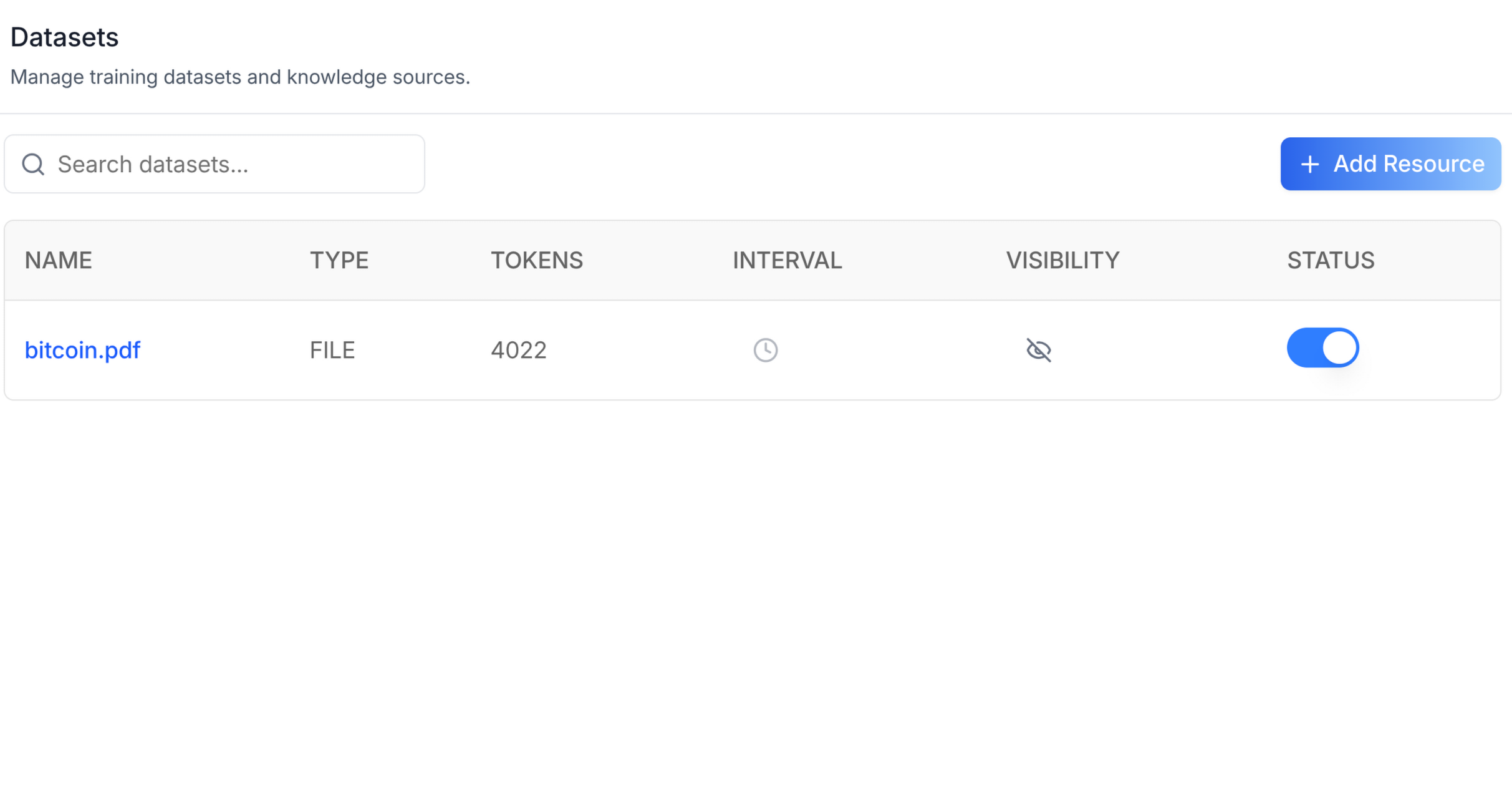
Add the agent **Datasets tab** -- a searchable, paginated table of datasets
with columns for name, type, tokens, interval, visibility, and status.
Includes an "Add Resource" slot for file uploads and a delete action per
row. This is one tab in the wider agent-settings family. All tabs share
the same `AgentSettingsProvider` wrapper.
Do NOT add custom styles, colors, or CSS overrides to ibl.ai SDK components.
They ship with their own styling. Keep the components as-is.
Do NOT implement dark mode unless the user explicitly asks for it.
When building custom UI around SDK components, use the ibl.ai brand:
- **Primary**: `#0058cc`, **Gradient**: `linear-gradient(135deg, #00b0ef, #0058cc)`
- **Button**: `bg-gradient-to-r from-[#2563EB] to-[#93C5FD] text-white`
- **Font**: System sans-serif stack, **Style**: shadcn/ui new-york variant
- Follow the component hierarchy: use ibl.ai SDK components
(`@iblai/iblai-js`) first, then shadcn/ui for everything else
(`npx shadcn@latest add <component>`). Do NOT write custom components
when an ibl.ai or shadcn equivalent exists. Both share the same
Tailwind theme and render in ibl.ai brand colors automatically.
- Follow [BRAND.md](https://raw.githubusercontent.com/iblai/vibe/refs/heads/main/BRAND.md) for
colors, typography, spacing, and component styles.
You MUST run `/iblai-ops-test` before telling the user the work is ready.
After all work is complete, start a dev server (`pnpm dev`) so the user
can see the result at http://localhost:3000.
`iblai.env` is NOT a `.env.local` replacement — it only holds the 3
shorthand variables (`DOMAIN`, `PLATFORM`, `TOKEN`). Next.js still reads
its runtime env vars from `.env.local`.
Use `pnpm` as the default package manager. Fall back to `npm` if pnpm
is not installed.
> **Common setup (brand, conventions, env files, verification):** see [docs/skill-setup.md](https://raw.githubusercontent.com/iblai/vibe/refs/heads/main/docs/skill-setup.md).
## Prerequisites
- Auth must be set up first (`/iblai-auth`)
- MCP and skills must be set up: `iblai add mcp`
- `AgentSettingsProvider` must wrap the route (see `/iblai-agent-setting`
Step 2 if not already set up)
- Ask the user for a real `mentorId` (agent UUID). Do NOT invent one.
## Step 0: Check for CLI Updates
Before running any `iblai` command, ensure the CLI is up to date.
Run `iblai --version` to check the current version, then upgrade directly:
- pip: `pip install --upgrade iblai-app-cli`
- npm: `npm install -g @iblai/cli@latest`
This is safe to run even if already at the latest version.
## Step 1: Check Environment
Before proceeding, check for an `iblai.env` in the project root. Look for
`PLATFORM`, `DOMAIN`, and `TOKEN` variables. If the file does not exist or
is missing these variables, tell the user:
"You need an `iblai.env` with your platform configuration. Download the
template and fill in your values:
`curl -o iblai.env https://raw.githubusercontent.com/iblai/vibe/refs/heads/main/iblai.env`"
## Step 2: Mount `AgentDatasetsTab`
```tsx
// app/(app)/agents/[mentorId]/datasets/page.tsx
"use client";
import { AgentDatasetsTab } from "@iblai/iblai-js/web-containers/next";
export default function AgentDatasetsPage() {
return (
<div className="flex h-full flex-col bg-white">
<AgentDatasetsTab />
</div>
);
}
```
### With custom Add Resource modal
The `AddResourceModal` prop is a render slot for file upload UI. When
omitted, the "Add Resource" button is shown but no modal opens. Inject
your own implementation:
```tsx
<AgentDatasetsTab
AddResourceModal={({ isOpen, onClose }) => (
<MyUploadModal open={isOpen} onClose={onClose} />
)}
/>
```
### With pagination
Inject a pagination component via the `PaginationComponent` prop:
```tsx
<AgentDatasetsTab
PaginationComponent={({ currentPage, totalPages, onPageChange, disabled }) => (
<MyPagination
page={currentPage}
total={totalPages}
onChange={onPageChange}
disabled={disabled}
/>
)}
/>
```
## Step 3: Customize Labels (Optional)
```tsx
import { AgentDatasetsTab } from "@iblai/iblai-js/web-containers/next";
<AgentDatasetsTab
labels={{
header: { title: "Training data" },
}}
/>;
```
## Step 4: Use MCP Tools for Customization
```
get_component_info("AgentDatasetsTab")
get_component_info("AgentSettingsProvider")
```
## `<AgentDatasetsTab>` Props
Import from `@iblai/iblai-js/web-containers/next`.
| Prop | Type | Required | Description |
|------|------|----------|-------------|
| `labels` | `DeepPartial<DatasetsTabLabels>` | No | Override user-visible strings |
| `onSelect` | `(dataset: Dataset) => void` | No | Called when a dataset row is selected |
| `selectedDatasetId` | `string` | No | Highlight the row matching this ID |
| `AddResourceModal` | `ComponentType<{ isOpen, onClose, keepParentOpen? }>` | No | Custom upload modal. Without it the button shows but no modal opens |
| `PaginationComponent` | `ComponentType<{ currentPage, totalPages, onPageChange, disabled }>` | No | Custom pagination. Without it no pagination UI renders |
## Related Exports
From `@iblai/iblai-js/web-containers/next`:
- `DatasetsTabLabels` -- type for the full label bundle.
- `Dataset` -- type for a single dataset row.
## Step 5: Verify
Run `/iblai-ops-test` before telling the user the work is ready:
1. `pnpm build` -- must pass with zero errors
2. `pnpm test` -- vitest must pass
3. Start dev server and touch test:
```bash
pnpm dev &
npx playwright screenshot http://localhost:3000/agents/<id>/dataset /tmp/agent-dataset.png
```
## Important Notes
- **Redux store**: Must include `mentorReducer` and `mentorMiddleware`
- **`initializeDataLayer()`**: 5 args (v1.2+)
- **`@reduxjs/toolkit`**: Deduplicated via webpack aliases in `next.config.ts`
- **Peer deps**: `sonner` and `@iblai/iblai-web-mentor` must be installed
(`pnpm add sonner @iblai/iblai-web-mentor`)
- **Shared provider**: `AgentSettingsProvider` must wrap the route at a
layout level. See `/iblai-agent-setting` Step 2 for the full snippet.
- **AddResourceModal**: The standalone app uses Dropbox/Google Drive/OneDrive
pickers with deep dependencies. Consumers inject their own implementation
to avoid pulling in those deps.
- **Brand guidelines**: [BRAND.md](https://raw.githubusercontent.com/iblai/vibe/refs/heads/main/BRAND.md)Related Skills
We are still matching the closest adjacent skills for this page. In the meantime, continue through the full directory.