iblai-agent-setting
Add the agent Settings tab (name, description, visibility, copy, delete) to your Next.js app
12 stars
byiblai
Best use case
iblai-agent-setting is best used when you need a repeatable AI agent workflow instead of a one-off prompt.
Add the agent Settings tab (name, description, visibility, copy, delete) to your Next.js app
Teams using iblai-agent-setting should expect a more consistent output, faster repeated execution, less prompt rewriting.
When to use this skill
- You want a reusable workflow that can be run more than once with consistent structure.
When not to use this skill
- You only need a quick one-off answer and do not need a reusable workflow.
- You cannot install or maintain the underlying files, dependencies, or repository context.
Installation
Claude Code / Cursor / Codex
$curl -o ~/.claude/skills/iblai-agent-setting/SKILL.md --create-dirs "https://raw.githubusercontent.com/iblai/vibe/main/skills/iblai-agent-setting/SKILL.md"
Manual Installation
- Download SKILL.md from GitHub
- Place it in
.claude/skills/iblai-agent-setting/SKILL.mdinside your project - Restart your AI agent — it will auto-discover the skill
How iblai-agent-setting Compares
| Feature / Agent | iblai-agent-setting | Standard Approach |
|---|---|---|
| Platform Support | Not specified | Limited / Varies |
| Context Awareness | High | Baseline |
| Installation Complexity | Unknown | N/A |
Frequently Asked Questions
What does this skill do?
Add the agent Settings tab (name, description, visibility, copy, delete) to your Next.js app
Where can I find the source code?
You can find the source code on GitHub using the link provided at the top of the page.
SKILL.md Source
# /iblai-agent-setting
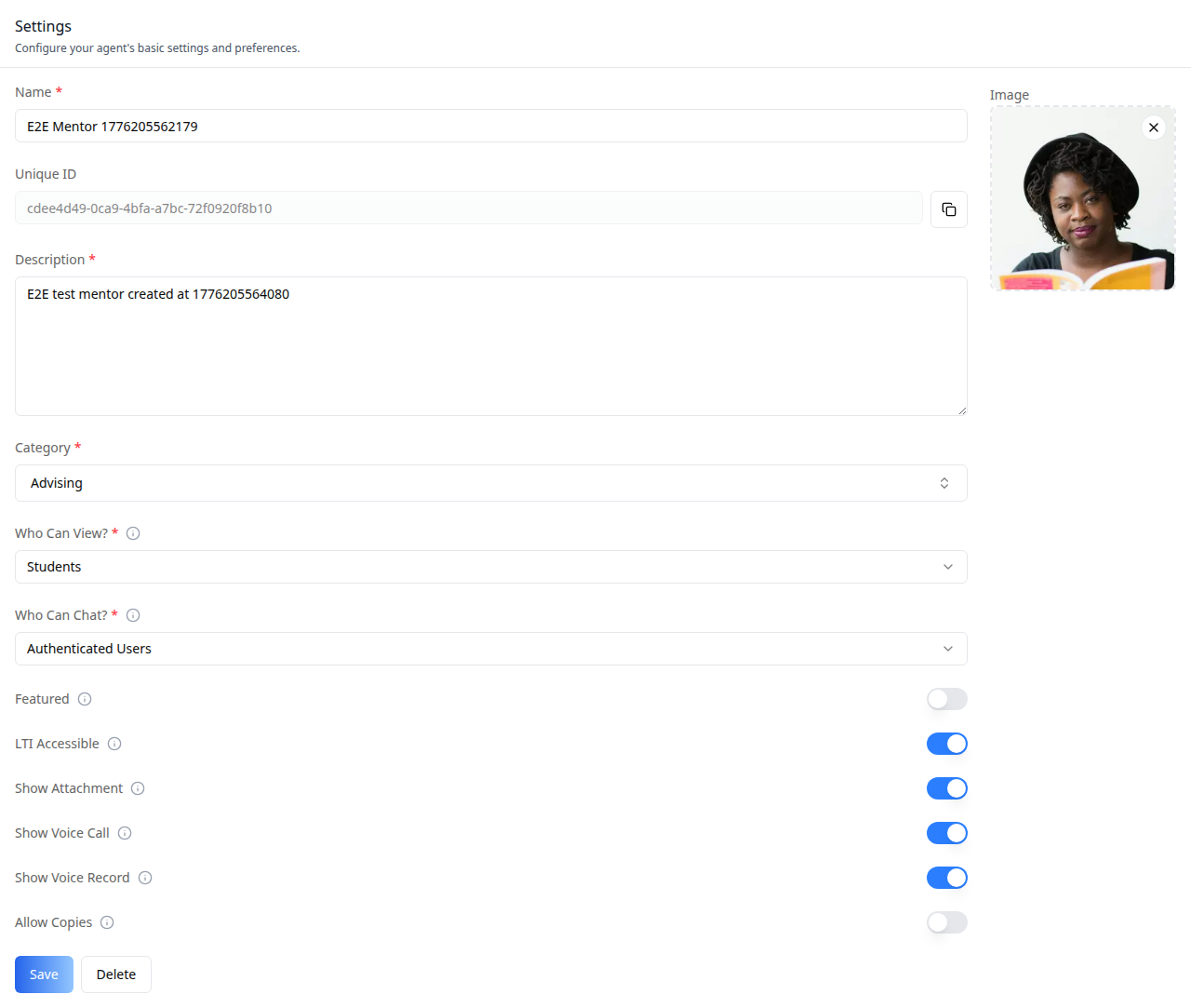
Add the agent **Settings tab** -- the core edit-mentor form with name,
description, avatar, visibility (administrators / students / anyone),
category, plus a Copy-to-tenant action and a Delete action. This is one
tab in the wider agent-settings family (`access`, `api`, `datasets`,
`disclaimers`, `embed`, `history`, `llm`, `memory`, `prompts`, `safety`,
`settings`, `tools`). Each tab is a separate skill. All tabs share the
same `AgentSettingsProvider` wrapper -- set it up once and mount as many
tabs as you need.
Do NOT add custom styles, colors, or CSS overrides to ibl.ai SDK components.
They ship with their own styling. Keep the components as-is.
Do NOT implement dark mode unless the user explicitly asks for it.
When building custom UI around SDK components, use the ibl.ai brand:
- **Primary**: `#0058cc`, **Gradient**: `linear-gradient(135deg, #00b0ef, #0058cc)`
- **Button**: `bg-gradient-to-r from-[#2563EB] to-[#93C5FD] text-white`
- **Font**: System sans-serif stack, **Style**: shadcn/ui new-york variant
- Follow the component hierarchy: use ibl.ai SDK components
(`@iblai/iblai-js`) first, then shadcn/ui for everything else
(`npx shadcn@latest add <component>`). Do NOT write custom components
when an ibl.ai or shadcn equivalent exists. Both share the same
Tailwind theme and render in ibl.ai brand colors automatically.
- Follow [BRAND.md](https://raw.githubusercontent.com/iblai/vibe/refs/heads/main/BRAND.md) for
colors, typography, spacing, and component styles.
You MUST run `/iblai-ops-test` before telling the user the work is ready.
After all work is complete, start a dev server (`pnpm dev`) so the user
can see the result at http://localhost:3000.
`iblai.env` is NOT a `.env.local` replacement — it only holds the 3
shorthand variables (`DOMAIN`, `PLATFORM`, `TOKEN`). Next.js still reads
its runtime env vars from `.env.local`.
Use `pnpm` as the default package manager. Fall back to `npm` if pnpm
is not installed.
> **Common setup (brand, conventions, env files, verification):** see [docs/skill-setup.md](https://raw.githubusercontent.com/iblai/vibe/refs/heads/main/docs/skill-setup.md).
## Prerequisites
- Auth must be set up first (`/iblai-auth`)
- MCP and skills must be set up: `iblai add mcp`
- Ask the user for a real `mentorId` (agent UUID). Do NOT invent one.
## Step 0: Check for CLI Updates
Before running any `iblai` command, ensure the CLI is up to date.
Run `iblai --version` to check the current version, then upgrade directly:
- pip: `pip install --upgrade iblai-app-cli`
- npm: `npm install -g @iblai/cli@latest`
This is safe to run even if already at the latest version.
## Step 1: Check Environment
Before proceeding, check for an `iblai.env` in the project root. Look for
`PLATFORM`, `DOMAIN`, and `TOKEN` variables. If the file does not exist or
is missing these variables, tell the user:
"You need an `iblai.env` with your platform configuration. Download the
template and fill in your values:
`curl -o iblai.env https://raw.githubusercontent.com/iblai/vibe/refs/heads/main/iblai.env`"
## Step 2: Wrap the Route in `AgentSettingsProvider`
All agent tabs (`AgentSettingsTab`, `AgentLLMTab`, `AgentPromptsTab`, etc.) read shared
identity from `AgentSettingsProvider`. Wrap your agent-settings route once;
every tab inside it reads from context.
```tsx
// app/(app)/agents/[mentorId]/layout.tsx
"use client";
import { AgentSettingsProvider } from "@iblai/iblai-js/web-containers/next";
import { useParams } from "next/navigation";
import { useEffect, useState } from "react";
export default function AgentSettingsLayout({
children,
}: {
children: React.ReactNode;
}) {
const { mentorId } = useParams<{ mentorId: string }>();
const [tenantKey, setTenantKey] = useState("");
const [username, setUsername] = useState("");
useEffect(() => {
try {
const raw = localStorage.getItem("userData");
if (raw) {
const parsed = JSON.parse(raw);
setUsername(parsed.user_nicename ?? parsed.username ?? "");
}
const resolvedTenant =
localStorage.getItem("app_tenant") ??
(() => {
try {
return JSON.parse(localStorage.getItem("current_tenant") ?? "{}").key;
} catch { return undefined; }
})() ??
localStorage.getItem("tenant") ??
"";
setTenantKey(resolvedTenant);
} catch {}
}, []);
if (!tenantKey || !username) return null;
return (
<AgentSettingsProvider
tenantKey={tenantKey}
mentorId={mentorId}
username={username}
enableRBAC={false}
>
{children}
</AgentSettingsProvider>
);
}
```
`enableRBAC` toggles gated-action prompts (e.g., "are you sure?") for
destructive actions. Leave `false` unless the host app wires an
`executeGatedAction` callback.
## Step 3: Mount `AgentSettingsTab`
```tsx
// app/(app)/agents/[mentorId]/settings/page.tsx
"use client";
import { useEffect, useState } from "react";
import {
AgentSettingsTab,
type CopyMentorTenant,
} from "@iblai/iblai-js/web-containers/next";
import { useRouter } from "next/navigation";
export default function AgentSettingsPage() {
const router = useRouter();
const [tenants, setTenants] = useState<CopyMentorTenant[]>([]);
const [isLoadingTenants, setIsLoadingTenants] = useState(true);
useEffect(() => {
try {
const raw = localStorage.getItem("tenants");
const parsed = raw ? JSON.parse(raw) : [];
setTenants(
parsed.map((t: any) => ({ key: t.key, name: t.name ?? t.key })),
);
} catch {}
setIsLoadingTenants(false);
}, []);
return (
<div className="flex h-full flex-col bg-white">
<AgentSettingsTab
tenants={tenants}
isLoadingTenants={isLoadingTenants}
onSuccessfulSave={(mentor) => {
console.log("saved", mentor);
}}
onSuccessfulDelete={() => {
router.push("/agents");
}}
onSuccessfulCopy={({ forkedMentorId, destinationTenantKey }) => {
router.push(`/agents/${forkedMentorId}?tenant=${destinationTenantKey}`);
}}
/>
</div>
);
}
```
## Step 4: Customize Labels (Optional)
`AgentSettingsTab` renders with the default agent-facing copy
(`AGENT_SETTINGS_TAB_LABELS`). Override any string via the `labels` prop.
Pass a full `SettingsTabLabels` bundle (for a full mentor/tutor/coach
re-skin) or a partial object (for one-off edits).
```tsx
import {
AgentSettingsTab,
type SettingsTabLabels,
AGENT_SETTINGS_TAB_LABELS,
} from "@iblai/iblai-js/web-containers/next";
const MENTOR_LABELS: SettingsTabLabels = {
...AGENT_SETTINGS_TAB_LABELS,
header: {
title: "Mentor settings",
description: "Configure your mentor's identity and visibility.",
},
};
<AgentSettingsTab tenants={tenants} labels={MENTOR_LABELS} />;
```
For a partial override, pass only the keys you want to change:
```tsx
<AgentSettingsTab
tenants={tenants}
labels={{
header: { title: "Tutor settings" },
fields: { whoCanView: { label: "Who can access this tutor?" } },
}}
/>
```
## Step 5: Use MCP Tools for Customization
```
get_component_info("AgentSettingsTab")
get_component_info("AgentSettingsProvider")
get_component_info("CopyMentorModal")
get_component_info("DeleteMentorModal")
```
## `<AgentSettingsTab>` Props
Import from `@iblai/iblai-js/web-containers/next`.
| Prop | Type | Required | Description |
|------|------|----------|-------------|
| `tenants` | `CopyMentorTenant[]` | Yes | Tenants the agent can be copied into (forwarded to `CopyMentorModal`) |
| `isLoadingTenants` | `boolean` | No | Loading state for the tenant list |
| `onSuccessfulSave` | `(mentor: MentorSettings) => void` | No | Fired after a successful save |
| `onSuccessfulDelete` | `(deletedMentorId: string) => void` | No | Fired after a successful delete |
| `onSuccessfulCopy` | `(params: { forkedMentorId, destinationTenantKey, isCrossTenantCopy }) => void` | No | Fired after a successful copy |
| `labels` | `DeepPartial<SettingsTabLabels>` | No | Override user-visible strings |
## `<AgentSettingsProvider>` Props
All tabs in the agent-settings family (`AgentSettingsTab`, `AgentLLMTab`, `AgentPromptsTab`,
etc.) read identity from this provider via `useAgentSettings()`.
| Prop | Type | Description |
|------|------|-------------|
| `tenantKey` | `string` | Current platform key |
| `mentorId` | `string` | The agent being edited |
| `username` | `string` | Current user |
| `enableRBAC` | `boolean` | Toggle gated-action prompts |
| `executeGatedAction` | `(action: () => void) => void` | Optional gate callback when `enableRBAC` is true |
## Related Exports
From `@iblai/iblai-js/web-containers/next`:
- `DeleteMentorModal`, `CopyMentorModal` -- used internally by `AgentSettingsTab`.
Export paths for standalone use (e.g., an "archive" action outside the tab).
- `resolveSettingsTabLabels` -- merges `DeepPartial<SettingsTabLabels>` with
defaults. Useful when composing bundles.
- `AGENT_SETTINGS_TAB_LABELS` -- the default agent-facing bundle.
## Step 6: Verify
Run `/iblai-ops-test` before telling the user the work is ready:
1. `pnpm build` -- must pass with zero errors
2. `pnpm test` -- vitest must pass
3. Start dev server and touch test:
```bash
pnpm dev &
npx playwright screenshot http://localhost:3000/agents/<id>/setting /tmp/agent-setting.png
```
## Important Notes
- **Redux store**: Must include `mentorReducer` and `mentorMiddleware`
- **`initializeDataLayer()`**: 5 args (v1.2+)
- **`@reduxjs/toolkit`**: Deduplicated via webpack aliases in `next.config.ts`
- **Peer deps**: `sonner` and `@iblai/iblai-web-mentor` must be installed
(`pnpm add sonner @iblai/iblai-web-mentor`)
- **Shared provider**: Mount `AgentSettingsProvider` at a layout level so
multiple tabs (`settings`, `llm`, `prompts`, ...) share one wrapper.
Do NOT wrap each tab page individually.
- **Tenants list**: The `tenants` prop drives the **Copy to tenant** flow.
If the user should not be able to copy cross-tenant, pass an empty array.
- **Labels ownership**: Consumer-specific bundles (mentor, tutor, coach)
live in the consuming app, not in `@iblai/iblai-js`. The package only
ships `AGENT_SETTINGS_TAB_LABELS` as a neutral default.
- **Brand guidelines**: [BRAND.md](https://raw.githubusercontent.com/iblai/vibe/refs/heads/main/BRAND.md)Related Skills
We are still matching the closest adjacent skills for this page. In the meantime, continue through the full directory.