Best use case
iblai-profile is best used when you need a repeatable AI agent workflow instead of a one-off prompt.
Add profile dropdown and settings page to your Next.js app
Teams using iblai-profile should expect a more consistent output, faster repeated execution, less prompt rewriting.
When to use this skill
- You want a reusable workflow that can be run more than once with consistent structure.
When not to use this skill
- You only need a quick one-off answer and do not need a reusable workflow.
- You cannot install or maintain the underlying files, dependencies, or repository context.
Installation
Claude Code / Cursor / Codex
$curl -o ~/.claude/skills/iblai-profile/SKILL.md --create-dirs "https://raw.githubusercontent.com/iblai/vibe/main/skills/iblai-profile/SKILL.md"
Manual Installation
- Download SKILL.md from GitHub
- Place it in
.claude/skills/iblai-profile/SKILL.mdinside your project - Restart your AI agent — it will auto-discover the skill
How iblai-profile Compares
| Feature / Agent | iblai-profile | Standard Approach |
|---|---|---|
| Platform Support | Not specified | Limited / Varies |
| Context Awareness | High | Baseline |
| Installation Complexity | Unknown | N/A |
Frequently Asked Questions
What does this skill do?
Add profile dropdown and settings page to your Next.js app
Where can I find the source code?
You can find the source code on GitHub using the link provided at the top of the page.
SKILL.md Source
# /iblai-profile
Add user profile features -- a compact avatar dropdown for your navbar and
a full settings page with tabs for Basic info, Social links, Education,
Experience, Resume, and Security.
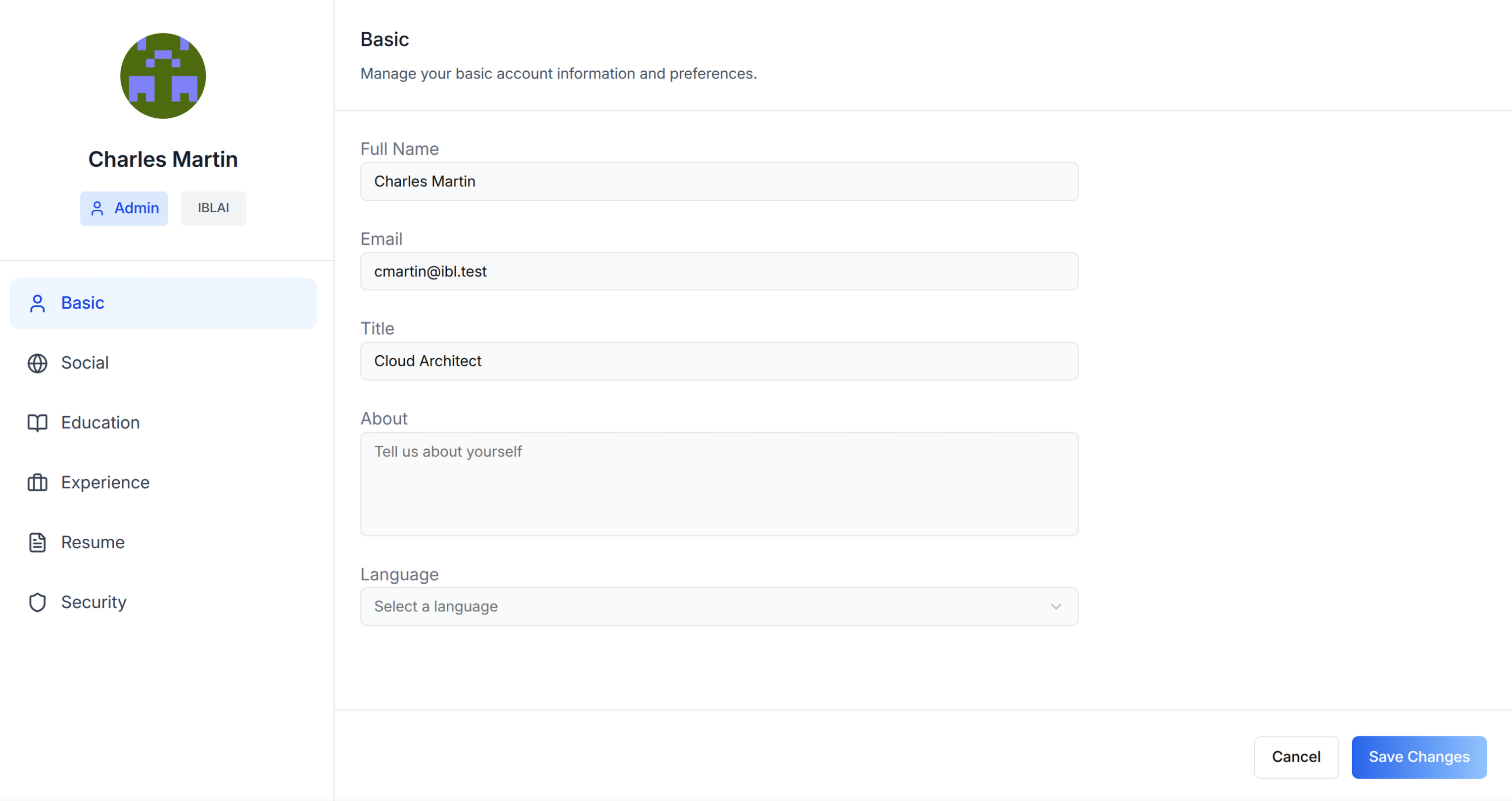
Do NOT add custom styles, colors, or CSS overrides to ibl.ai SDK components.
They ship with their own styling. Keep the components as-is.
Do NOT implement dark mode unless the user explicitly asks for it.
When building custom UI around SDK components, use the ibl.ai brand:
- **Primary**: `#0058cc`, **Gradient**: `linear-gradient(135deg, #00b0ef, #0058cc)`
- **Button**: `bg-gradient-to-r from-[#2563EB] to-[#93C5FD] text-white`
- **Font**: System sans-serif stack, **Style**: shadcn/ui new-york variant
- Follow the component hierarchy: use ibl.ai SDK components
(`@iblai/iblai-js`) first, then shadcn/ui for everything else
(`npx shadcn@latest add <component>`). Do NOT write custom components
when an ibl.ai or shadcn equivalent exists. Both share the same
Tailwind theme and render in ibl.ai brand colors automatically.
- Follow [BRAND.md](https://raw.githubusercontent.com/iblai/vibe/refs/heads/main/BRAND.md) for
colors, typography, spacing, and component styles.
You MUST run `/iblai-ops-test` before telling the user the work is ready.
After all work is complete, start a dev server (`pnpm dev`) so the user
can see the result at http://localhost:3000.
`iblai.env` is NOT a `.env.local` replacement — it only holds the 3
shorthand variables (`DOMAIN`, `PLATFORM`, `TOKEN`). Next.js still reads
its runtime env vars from `.env.local`.
Use `pnpm` as the default package manager. Fall back to `npm` if pnpm
is not installed. The generated app should live in the current directory,
not in a subdirectory.
When building a navbar or header, do NOT display the tenant/platform name.
Use the ibl.ai logo instead.
> **Navbar:** If the user wants a navbar with the profile dropdown, guide
> them to `/iblai-navbar` first. That skill creates the full navbar with
> logo, page links, notification bell, and profile dropdown.
> **Common setup (brand, conventions, env files, verification):** see [docs/skill-setup.md](https://raw.githubusercontent.com/iblai/vibe/refs/heads/main/docs/skill-setup.md).
## Step 0: Start from vibe-starter? (new projects)
Before running this skill, ask the user:
> Are you starting a new project from scratch? vibe-starter
> (https://github.com/iblai/vibe-starter/tree/spa) already ships the profile
> dropdown and /profile page wired up, alongside auth, navbar, and
> account/notifications. Want to use that instead?
If yes, clone into a temp directory and copy into the current directory before
installing (running pnpm install inside the cloned subdirectory causes hardlink
issues), then skip this skill:
git clone -b spa https://github.com/iblai/vibe-starter.git vibe-starter-init
cp -a vibe-starter-init/. . && rm -rf vibe-starter-init
pnpm install
If they prefer to add the profile features to an existing app, continue below.
## Prerequisites
- Auth must be set up first (`/iblai-auth`)
- MCP and skills must be set up: `iblai add mcp`
## Check for CLI Updates
Before running any `iblai` command, ensure the CLI is
up to date. Run `iblai --version` to check the current version, then
upgrade directly:
- pip: `pip install --upgrade iblai-app-cli`
- npm: `npm install -g @iblai/cli@latest`
This is safe to run even if already at the latest version.
## Step 1: Check Environment
Before proceeding, check for a `iblai.env`
in the project root. Look for `PLATFORM`, `DOMAIN`, and `TOKEN` variables.
If the file does not exist or is missing these variables, tell the user:
"You need an `iblai.env` with your platform configuration. Download the
template and fill in your values:
`curl -o iblai.env https://raw.githubusercontent.com/iblai/vibe/refs/heads/main/iblai.env`"
## Step 2: Run the Generator
```bash
iblai add profile
```
## What Was Generated
| File | Purpose |
|------|---------|
| `components/iblai/profile-dropdown.tsx` | Avatar dropdown for navbar with profile, organization, tenant switcher, and logout |
The dropdown reads `userData`, `tenant`/`current_tenant`, and `tenants` from
localStorage. Admin status is derived from the `tenants` array by matching
the current tenant key against `is_admin`.
The dropdown shows: **Profile** (links to `/profile`),
**Organization** (links to `/account`), **Tenant Switcher**, and **Logout**.
## Step 3: Add a Full Profile Page
The generator creates the dropdown only. You must create the profile **page**
manually using the `Profile` component (not `UserProfileModal`, which renders
as a dialog).
Import `Profile` from `@iblai/iblai-js/web-containers` (the framework-agnostic
bundle, NOT the `/next` bundle). This renders an inline, full-page profile
editor with sidebar navigation on desktop and tabbed navigation on mobile.
### Reference implementation
```tsx
// app/(app)/profile/page.tsx
"use client";
import { useEffect, useState } from "react";
import { Profile } from "@iblai/iblai-js/web-containers";
import { resolveAppTenant } from "@/lib/iblai/tenant";
export default function ProfilePage() {
const [tenantKey, setTenantKey] = useState("");
const [username, setUsername] = useState("");
const [isAdmin, setIsAdmin] = useState(false);
const [ready, setReady] = useState(false);
useEffect(() => {
try {
const raw = localStorage.getItem("userData");
if (raw) {
const parsed = JSON.parse(raw);
setUsername(parsed.user_nicename ?? parsed.username ?? "");
}
} catch {}
const resolved = resolveAppTenant();
setTenantKey(resolved);
try {
const tenantsRaw = localStorage.getItem("tenants");
if (tenantsRaw) {
const parsed = JSON.parse(tenantsRaw);
const match = parsed.find((t: any) => t.key === resolved);
if (match) setIsAdmin(!!match.is_admin);
}
} catch {}
setReady(true);
}, []);
if (!ready || !tenantKey) {
return (
<div className="flex flex-1 items-center justify-center">
<p className="text-sm text-gray-400">Loading profile...</p>
</div>
);
}
return (
<div className="mx-auto w-full flex-1 overflow-auto px-4 py-8 md:w-[75vw] md:px-0">
<div className="rounded-lg border border-[var(--border-color)] bg-white overflow-hidden">
<Profile
tenant={tenantKey}
username={username}
isAdmin={isAdmin}
onClose={() => {}}
customization={{
showPlatformName: true,
useGravatarPicFallback: true,
}}
targetTab="basic"
/>
</div>
</div>
);
}
```
### Key patterns
- **White container wrapper**: The SDK Profile component has no outer background.
Wrap it in a `bg-white rounded-lg border` container so it renders as a card
against the gray page background (`--sidebar-bg: #fafbfc`).
- **`Profile` vs `UserProfileModal`**: `Profile` renders inline (full page).
`UserProfileModal` renders as a dialog overlay. Use `Profile` for a
dedicated `/profile` route.
- **Import path**: `@iblai/iblai-js/web-containers` (NOT `/next`).
## Step 4: Enable Tenant Switcher in the Dropdown
The generator does NOT enable the tenant switcher by default. You must pass
the `userTenants` prop and set `showTenantSwitcher` to `true`:
```tsx
// In profile-dropdown.tsx, add:
const userTenants = useMemo(() => {
if (typeof window === "undefined") return [];
try {
const raw = localStorage.getItem("tenants");
return raw ? JSON.parse(raw) : [];
} catch {
return [];
}
}, []);
// Then pass to the component:
<UserProfileDropdown
userTenants={userTenants}
showTenantSwitcher
showAccountTab
// ...other props
/>
```
Without `userTenants`, the tenant switcher will not appear even when
`showTenantSwitcher` is `true`.
## Step 5: Use MCP Tools for Customization
```
get_component_info("UserProfileDropdown")
get_component_info("Profile")
get_component_info("MediaBox")
get_component_info("ResumeTab")
```
---
## Profile Content API
The SDK `Profile` component handles all API calls internally. If you need
to build custom profile UIs or interact with profile data programmatically,
here are the APIs each tab uses.
**Read before write.** When calling these REST endpoints directly (e.g.
via `fetch` or `curl`), always GET the current data first, merge your
changes into it, then POST/PUT the full object back. Most endpoints
replace the entire resource -- they do NOT merge fields. Skipping the
read will silently erase fields you didn't include in the payload.
```bash
# 1. Read current state
curl -s "{dmUrl}/api/career/orgs/{org}/education/users/alice/" \
-H "Authorization: Token {dm_token}" > education.json
# 2. Merge your changes into the existing data
# 3. Write back the full object
curl -X PUT "{dmUrl}/api/career/orgs/{org}/education/users/alice/?id={education_id}" \
-H "Authorization: Token {dm_token}" \
-H "Content-Type: application/json" \
-d @education.json
```
This applies to all profile endpoints: education, experience, and resume.
### Service
Profile data lives in the DM (data manager) service:
| Service | Base URL | Auth Header | Manages |
|---------|----------|-------------|---------|
| **DM** | `config.dmUrl()` | `Authorization: Token {dm_token}` | Education, experience, companies, institutions, resume |
### Basic, Social, and Profile Image
Basic info (name, email, title, bio, language), social links, profile
image, and password reset are user-scope and not exposed via the
platform Api-Token. Use the SDK `Profile` component, which handles
these via the user's session — no direct REST endpoints are documented
here.
### Education Tab
CRUD operations for education entries. Uses the DM career API.
```
GET {dmUrl}/api/career/orgs/{org}/education/users/{username}/
POST {dmUrl}/api/career/orgs/{org}/education/users/{username}/
PUT {dmUrl}/api/career/orgs/{org}/education/users/{username}/?id={education_id}
DELETE {dmUrl}/api/career/orgs/{org}/education/users/{username}/?id={education_id}
```
**Education schema:**
```typescript
{
id: number;
institution: { id: number; name: string };
institution_id: number; // required for create/update
degree: string;
field_of_study: string;
start_date: string; // "YYYY-MM-DD"
end_date: string | null;
is_current: boolean;
grade: string;
activities: string;
description: string;
data: Record<string, any>; // arbitrary metadata
metadata: Record<string, any>;
}
```
**Institutions** (lookup for the institution picker):
```
GET {dmUrl}/api/career/orgs/{org}/institutions/users/{username}/
POST {dmUrl}/api/career/orgs/{org}/institutions/users/{username}/
```
Institution create payload:
```typescript
{ name: string; institution_type: InstitutionTypeEnum; established_year?: number }
```
### Experience Tab
CRUD operations for professional experience entries.
```
GET {dmUrl}/api/career/orgs/{org}/experience/users/{username}/
POST {dmUrl}/api/career/orgs/{org}/experience/users/{username}/
PUT {dmUrl}/api/career/orgs/{org}/experience/users/{username}/?id={experience_id}
DELETE {dmUrl}/api/career/orgs/{org}/experience/users/{username}/?id={experience_id}
```
**Experience schema:**
```typescript
{
id: number;
company: { id: number; name: string };
company_id: number; // required for create/update
title: string;
employment_type: string; // "Full-time", "Part-time", "Contract", "Freelance", "Internship"
location: string;
start_date: string; // "YYYY-MM-DD"
end_date: string | null;
is_current: boolean;
description: string;
data: Record<string, any>;
metadata: Record<string, any>;
}
```
**Companies** (lookup for the company picker):
```
GET {dmUrl}/api/career/orgs/{org}/companies/users/{username}/
POST {dmUrl}/api/career/orgs/{org}/companies/users/{username}/
```
Company create payload:
```typescript
{ name: string; industry?: string; website?: string; logo_url?: string }
```
### Resume Tab
Upload and view PDF resumes.
```
GET {dmUrl}/api/career/resume/orgs/{org}/users/{username}/
POST {dmUrl}/api/career/resume/orgs/{org}/users/{username}/
PUT {dmUrl}/api/career/resume/orgs/{org}/users/{username}/
```
**Upload** (FormData):
```
user: {username}
platform: {org}
resume: File // PDF only, max 25MB -- marks as CV
additional_files: File // general file upload (not CV)
```
**Response:**
```typescript
{
id: number;
user: number;
platform: string;
files: [{ name: string; url: string; type: string }];
links: [{ url: string }];
}
```
### Security Tab
Account deletion.
```
POST {dmUrl}/api/core/users/delete/ // account deletion (self-retire)
```
Account deletion payload: `{ username: string }`. Password reset is
user-scope and runs through the SDK / Auth SPA, not via the platform
Api-Token.
### RTK Query Hooks (SDK Exports)
The SDK's data-layer exports these hooks for all career operations:
```typescript
import {
useGetUserEducationQuery,
useCreateUserEducationMutation,
useUpdateUserEducationMutation,
useDeleteUserEducationMutation,
useGetUserExperienceQuery,
useCreateUserExperienceMutation,
useUpdateUserExperienceMutation,
useDeleteUserExperienceMutation,
useGetUserInstitutionsQuery,
useCreateUserInstitutionMutation,
useGetUserCompaniesQuery,
useCreateUserCompanyMutation,
useGetUserResumeQuery,
useCreateUserResumeMutation,
} from "@iblai/iblai-js/data-layer";
```
For user metadata (basic/social):
```typescript
import {
useGetUserMetadataQuery,
useUpdateUserMetadataMutation,
useUploadProfileImageMutation,
useGetUserMetadataEdxQuery,
useResetPasswordMutation,
} from "@iblai/iblai-js/data-layer";
```
### Building a Custom Career API Slice
If you need career APIs without the SDK's built-in hooks, build a standard
RTK Query slice with `fetchBaseQuery` and one endpoint per row in the
endpoint tables above. Use `Authorization: Token {dm_token}` (from
localStorage), and tag invalidation on `["education", "experience",
"institution", "company", "resume"]`.
---
## User Metadata API
The ibl.ai platform provides per-user metadata storage via the **Mentor
Metadata** endpoint. This is useful for storing arbitrary JSON data scoped
to a specific user and mentor (e.g. application progress, preferences,
onboarding state).
### Endpoints
```
GET {dmUrl}/api/ai/mentor/orgs/{org}/users/{username}/metadata?mentor={mentorId}
POST {dmUrl}/api/ai/mentor/orgs/{org}/metadata/ body: { mentor_id, metadata }
```
- **Auth**: `Authorization: Token {axd_token}` (from localStorage)
- **Scope**: Per-user, per-mentor; isolated.
- **Schema**: Arbitrary JSON.
- **Merge behavior**: POST merges new keys with existing metadata
(does not replace the entire object).
---
## AI Profile Memory API
The platform stores AI-learned facts about a user as tag/detail pairs.
This powers the "AI Memory" tab in the profile modal.
```
GET {dmUrl}/api/ai-mentor/orgs/{org}/users/{user_id}/ai-user-profile-memory/
POST {dmUrl}/api/ai-mentor/orgs/{org}/users/{user_id}/ai-user-profile-memory/
DELETE {dmUrl}/api/ai-mentor/orgs/{org}/users/{user_id}/ai-user-profile-memory/{tag}/
```
**Create/Read:**
```typescript
// Request
{ tag: "favorite-animal", detail: "my favorite animal is cat" }
// Response (array of entries)
[{ tag: "favorite-animal", detail: "my favorite animal is cat" }]
```
**Auth**: Uses `axd_token` from localStorage.
---
## Chat Privacy Settings
Users can control how their chat data is stored.
```
GET {dmUrl}/api/ai-account/orgs/{org}/users/{user_id}/chat-privacy-config/
GET {dmUrl}/api/ai-account/orgs/{org}/users/{user_id}/chat-privacy-settings/
POST {dmUrl}/api/ai-account/orgs/{org}/users/{user_id}/chat-privacy-settings/
```
**Privacy modes**: `normal`, `anonymized`, `disabled`
The config endpoint returns whether the platform has this feature enabled.
The settings endpoint reads/writes the user's preference.
---
## Media Upload (MediaBox)
The SDK provides a `MediaBox` component for file and link uploads. It renders
a tabbed interface with a file upload zone and a link input field, plus a
list of previously uploaded files/links.
### Import
```typescript
import { MediaBox, type UploadedFile } from "@iblai/iblai-js/web-containers/next";
```
### Props
| Prop | Type | Description |
|------|------|-------------|
| `uploadedMedia` | `UploadedFile[]` | Previously uploaded files/links to display |
| `isLoading` | `boolean?` | Show loading state |
| `isError` | `boolean?` | Show error state |
| `isUploading` | `boolean?` | Show upload-in-progress state |
| `resumeCheckboxEnabled` | `boolean?` | Show "This is my CV" checkbox |
| `onUploadFile` | `(file: File, isResume: boolean) => void` | Called when a file is selected |
| `onUploadLink` | `(url: string) => void` | Called when a link is submitted |
| `onError` | `(message: string) => void` | Called on validation errors |
### UploadedFile type
```typescript
interface UploadedFile {
name: string;
url: string;
type?: string; // "link" for links, MIME type for files
}
```
### Peer dependency
MediaBox requires `@tanstack/react-form`:
```bash
pnpm add @tanstack/react-form
```
### Backend: Career/Resume API
MediaBox is a presentational component -- it does not handle uploads itself.
You must connect it to the Career/Resume API for persistent storage:
```
GET/PUT/POST /api/career/resume/orgs/{org}/users/{username}/
```
#### Connecting MediaBox to the Career API
```tsx
import { useMemo } from "react";
import { toast } from "sonner";
import { MediaBox, type UploadedFile } from "@iblai/iblai-js/web-containers/next";
import { useGetUserResumeQuery, useCreateUserResumeMutation } from "@/services/career-api";
import { resolveAppTenant } from "@/lib/iblai/tenant";
function getUserName(): string {
if (typeof window === "undefined") return "";
try {
const raw = localStorage.getItem("userData");
return raw ? JSON.parse(raw).user_nicename ?? "" : "";
} catch { return ""; }
}
export function DocumentUploads() {
const org = useMemo(() => resolveAppTenant(), []);
const username = useMemo(() => getUserName(), []);
const { data, isLoading, isError, refetch } = useGetUserResumeQuery(
{ org, username },
{ skip: !org || !username }
);
const [createResume, { isLoading: isUploading }] = useCreateUserResumeMutation();
const uploadedMedia: UploadedFile[] = useMemo(() => {
if (!data) return [];
const files = (data.files ?? []).map((f) => ({ name: f.name, url: f.url, type: f.type }));
const links = (data.links ?? []).map((l) => ({ name: l.url, url: l.url, type: "link" }));
return [...files, ...links];
}, [data]);
async function handleUploadFile(file: File, isResume: boolean) {
const formData = new FormData();
formData.append("user", username);
formData.append("platform", org);
formData.append(isResume ? "resume" : "additional_files", file);
try {
await createResume({ org, username, resume: formData, method: "POST" }).unwrap();
toast.success("File uploaded successfully");
refetch();
} catch { toast.error("Failed to upload file"); }
}
async function handleUploadLink(url: string) {
const formData = new FormData();
formData.append("user", username);
formData.append("platform", org);
const existingLinks = data?.links ?? [];
existingLinks.forEach((link, index) => {
formData.append(`link_${existingLinks.length + 1 - index}`, link.url);
});
formData.append("link_1", url);
try {
await createResume({ org, username, resume: formData }).unwrap();
toast.success("Link added successfully");
refetch();
} catch { toast.error("Failed to add link"); }
}
if (!org || !username) {
return <p className="text-[14px] text-[#86868b]">Please sign in to upload documents.</p>;
}
return (
<MediaBox
uploadedMedia={uploadedMedia}
isLoading={isLoading}
isError={isError}
isUploading={isUploading}
resumeCheckboxEnabled={true}
onUploadFile={handleUploadFile}
onUploadLink={handleUploadLink}
onError={(msg) => toast.error(msg)}
/>
);
}
```
#### Key details
- **Auth**: Uses `dm_token` from localStorage (NOT `axd_token`)
- **FormData fields**: `user` (username), `platform` (org key),
`resume` (file, marks as CV) or `additional_files` (file, general upload)
- **Links**: Append numbered `link_N` fields. Preserve existing links when
adding a new one
- **Persistent**: Files are stored on the user's profile permanently
(unlike chat file uploads which are session-scoped)
## Career Profile Tabs (Standalone)
The SDK also exports individual career profile tabs that can be used
outside the full `Profile` component:
### ResumeTab
```typescript
import { ResumeTab } from "@iblai/iblai-js/web-containers";
<ResumeTab org={tenantKey} username={username} />
```
Renders a resume upload and display interface. Props: `org` (string),
`username` (string).
### EducationTab
```typescript
import { EducationTab } from "@iblai/iblai-js/web-containers";
<EducationTab org={tenantKey} username={username} />
```
Renders education background management (add/edit/delete education entries).
Props: `org` (string), `username` (string).
### ExperienceTab
```typescript
import { ExperienceTab } from "@iblai/iblai-js/web-containers";
<ExperienceTab org={tenantKey} username={username} />
```
Renders professional experience management. Props: `org` (string),
`username` (string).
### Dialogs
These companion dialogs can be used alongside the tabs:
| Component | Import | Description |
|-----------|--------|-------------|
| `EducationDialog` | `@iblai/iblai-js/web-containers` | Dialog for adding/editing education entries |
| `ExperienceDialog` | `@iblai/iblai-js/web-containers` | Dialog for adding/editing experience entries |
| `CompanyDialog` | `@iblai/iblai-js/web-containers` | Company selection dialog |
| `InstitutionDialog` | `@iblai/iblai-js/web-containers` | Institution selection dialog |
## `<UserProfileDropdown>` Props
The generated dropdown component. Import from `@iblai/iblai-js/web-containers/next`.
| Prop | Type | Description |
|------|------|-------------|
| `username` | `string` | Username |
| `tenantKey` | `string` | Tenant/org key |
| `userIsAdmin` | `boolean` | Shows admin badge + settings |
| `userTenants` | `Tenant[]` | **Required for tenant switcher** -- full tenant list from localStorage |
| `showProfileTab` | `boolean` | Show profile link |
| `showAccountTab` | `boolean` | Show account settings link |
| `showTenantSwitcher` | `boolean` | Show tenant switcher (needs `userTenants`) |
| `showLogoutButton` | `boolean` | Show logout button |
| `showHelpLink` | `boolean` | Show help link |
| `authURL` | `string` | Auth service URL |
| `onLogout` | `() => void` | Logout callback |
| `onTenantChange` | `(tenant: string) => void` | Called when user switches tenant -- must set `app_tenant` in localStorage |
| `onTenantUpdate` | `(tenant: Tenant) => void` | Called when tenant data updates -- must set `app_tenant` in localStorage |
| `className` | `string?` | Additional CSS class |
| `dropdownClassName` | `string?` | CSS class for dropdown panel |
| `avatarSize` | `number?` | Avatar size in pixels |
| `metadata` | `{ help_center_url?: string; show_help?: boolean }` | Platform metadata for help link |
| `metadataLoaded` | `boolean?` | Whether metadata has finished loading |
| `enableMemoryTab` | `boolean?` | Show AI memory management tab |
| `enableCatalogInvite` | `boolean?` | Enable catalog invite feature |
| `enableRbac` | `boolean?` | Enable RBAC permission checks |
| `isModalOpen` | `boolean?` | Control profile modal open state externally |
| `onModalOpenChange` | `(open: boolean) => void` | Callback when modal open state changes |
| `defaultActiveTab` | `string?` | Default tab when profile modal opens |
| `onAccountDeleted` | `() => void` | Callback after account deletion |
## `<Profile>` Props (Full-Page Profile)
Import from `@iblai/iblai-js/web-containers`.
| Prop | Type | Description |
|------|------|-------------|
| `tenant` | `string` | Tenant/org key |
| `username` | `string` | Username |
| `isAdmin` | `boolean` | Admin flag |
| `onClose` | `() => void` | Close callback |
| `customization` | `object` | See below |
| `targetTab` | `string` | Initial tab: `basic`, `social`, `education`, `experience`, `resume`, `security` |
| `enableMemoryTab` | `boolean?` | Show AI memory management tab |
| `localLLMProps` | `object?` | Props for local LLM tab (Tauri desktop only) |
| `onAccountDeleted` | `() => void` | Callback after account deletion |
### Customization object
```typescript
{
showMentorAIDisplayCheckbox?: boolean; // Show "visible on MentorAI" toggle
showLeaderboardDisplayCheckbox?: boolean; // Show leaderboard opt-in
showUsernameField?: boolean; // Show username field (read-only)
showPlatformName?: boolean; // Show platform/tenant name badge
useGravatarPicFallback?: boolean; // Use Gravatar when no profile pic
}
```
## `<UserProfileModal>` Props (Profile + Account Modal)
For a profile editing modal (used by the MentorAI reference app), import
`UserProfileModal` from `@iblai/iblai-js/web-containers/next`. This is a
dialog that combines profile editing and account settings in one overlay.
The modal shows **Profile** tabs (basic, social, education, experience,
resume, security) and **Account** tabs (organization, management,
integrations, billing). Billing/purchases is on the Account side, not
the Profile side.
### Required
| Prop | Type | Description |
|------|------|-------------|
| `isOpen` | `boolean` | Whether the modal is visible |
| `onClose` | `() => void` | Close callback |
| `params` | `{ tenantKey: string; mentorId?: string; isAdmin?: boolean }` | Tenant key, optional mentor ID and admin flag |
| `authURL` | `string` | Auth service URL (from `config.authUrl()`) |
### Optional
| Prop | Type | Description |
|------|------|-------------|
| `tenants` | `Tenant[]` | Full list of user tenants from localStorage |
| `targetTab` | `string` | Initial tab: `basic`, `social`, `education`, `experience`, `resume`, `security`, `organization`, `management`, `integrations`, `billing` |
| `showPlatformName` | `boolean` | Show tenant name badge |
| `useGravatarPicFallback` | `boolean` | Use Gravatar when no profile pic |
| `currentSPA` | `string` | Current app identifier (e.g., `"agent"`) |
| `currentPlatformBaseDomain` | `string` | Base domain for custom domain settings |
| `billingEnabled` | `boolean` | Enable billing tab (requires Stripe integration) |
| `billingURL` | `string` | Stripe billing portal URL |
| `topUpEnabled` | `boolean` | Enable credit top-up |
| `topUpURL` | `string` | Stripe top-up URL |
| `onTenantUpdate` | `(tenant: Tenant) => void` | Called when tenant is updated |
| `onBillingTabRequest` | `() => Promise<void> \| void` | Called when billing tab is opened -- fetch billing data |
| `onUpgradeClick` | `() => void` | Called when upgrade button is clicked |
| `onAccountDeleted` | `() => void` | Called after account deletion |
## Step 6: Verify
Run `/iblai-ops-test` before telling the user the work is ready:
1. `pnpm build` -- must pass with zero errors
2. `pnpm test` -- vitest must pass
3. Start dev server and touch test:
```bash
pnpm dev &
npx playwright screenshot http://localhost:3000/profile /tmp/profile.png
```
## Important Notes
- **Redux store**: Must include `mentorReducer` and `mentorMiddleware`
- **`initializeDataLayer()`**: 5 args (v1.2+)
- **`@reduxjs/toolkit`**: Deduplicated via webpack aliases in `next.config.ts`
- **Admin detection**: Derived from `tenants` array in localStorage
- **SDK hardcoded styles**: The SDK Profile component uses `bg-white` and
`bg-gray-50` internally. Do NOT override these. Instead, wrap the component
in a white container so it renders correctly against the gray page background.
- **Billing/Purchases**: Lives on the Account page (`/iblai-account`), not
on the Profile page. Use `UserProfileModal` with `targetTab="billing"` and
`billingEnabled={true}` to access it from the combined modal.
- **Brand guidelines**: [BRAND.md](https://raw.githubusercontent.com/iblai/vibe/refs/heads/main/BRAND.md)Related Skills
We are still matching the closest adjacent skills for this page. In the meantime, continue through the full directory.