iblai-project
Add the in-process Projects surface (project landing page — chat input + project files + instructions + assigned agents) to a Next.js app
Best use case
iblai-project is best used when you need a repeatable AI agent workflow instead of a one-off prompt.
Add the in-process Projects surface (project landing page — chat input + project files + instructions + assigned agents) to a Next.js app
Teams using iblai-project should expect a more consistent output, faster repeated execution, less prompt rewriting.
When to use this skill
- You want a reusable workflow that can be run more than once with consistent structure.
When not to use this skill
- You only need a quick one-off answer and do not need a reusable workflow.
- You cannot install or maintain the underlying files, dependencies, or repository context.
Installation
Claude Code / Cursor / Codex
Manual Installation
- Download SKILL.md from GitHub
- Place it in
.claude/skills/iblai-project/SKILL.mdinside your project - Restart your AI agent — it will auto-discover the skill
How iblai-project Compares
| Feature / Agent | iblai-project | Standard Approach |
|---|---|---|
| Platform Support | Not specified | Limited / Varies |
| Context Awareness | High | Baseline |
| Installation Complexity | Unknown | N/A |
Frequently Asked Questions
What does this skill do?
Add the in-process Projects surface (project landing page — chat input + project files + instructions + assigned agents) to a Next.js app
Where can I find the source code?
You can find the source code on GitHub using the link provided at the top of the page.
SKILL.md Source
# /iblai-project
Add the ibl.ai **project** surface to your Next.js app: project files,
project instructions, list of agents assigned to a project, and the
project-scoped chat input. Reuses the SDK's `Chat` component — when you
pass a `projectId`, the SDK automatically swaps its default
welcome/explore surface for `ProjectLandingPage`. The same `<Chat>` you
already mounted for `/iblai-agent-chat` does both modes; this skill
just adds the routing + URL plumbing.
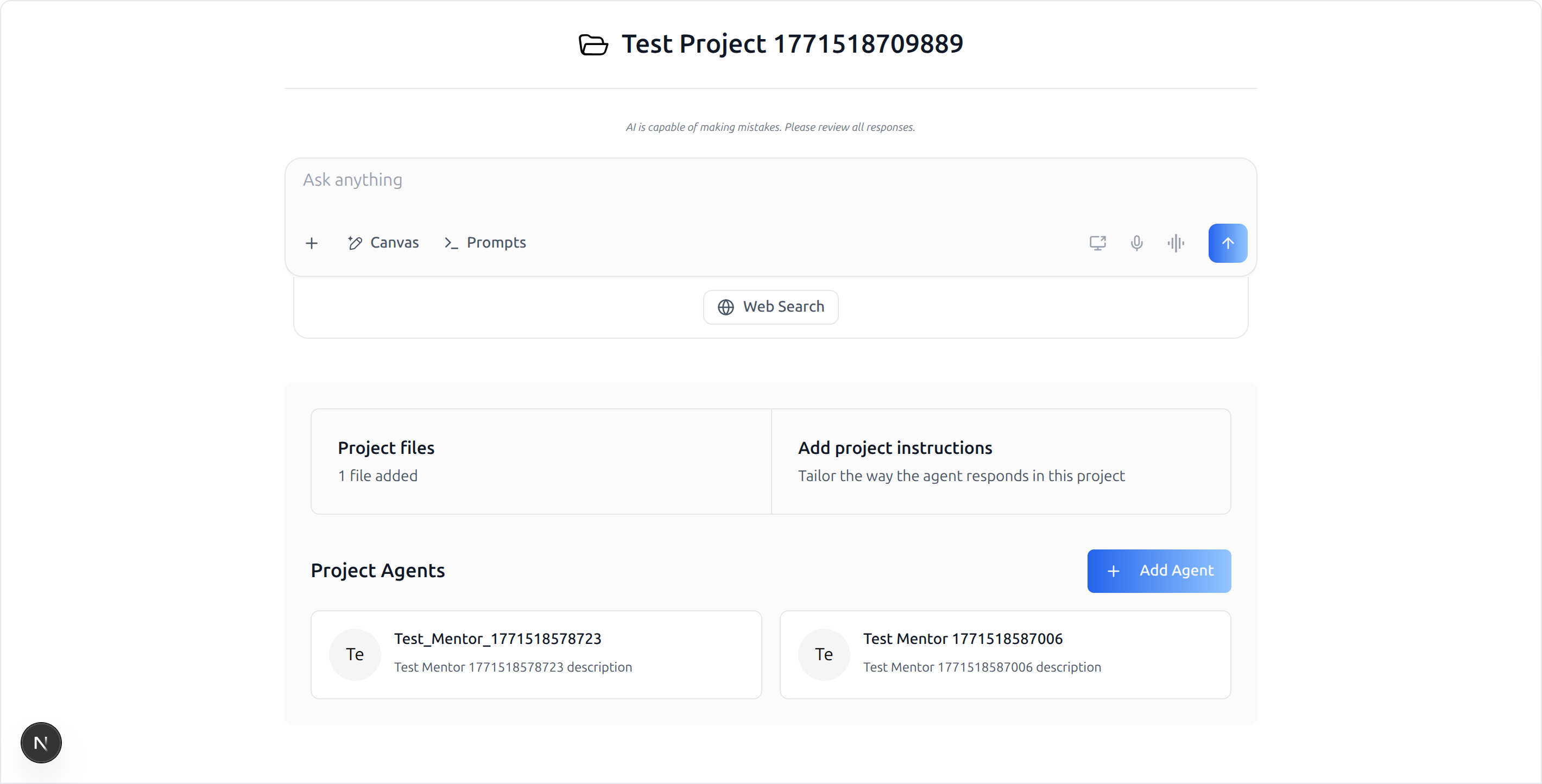
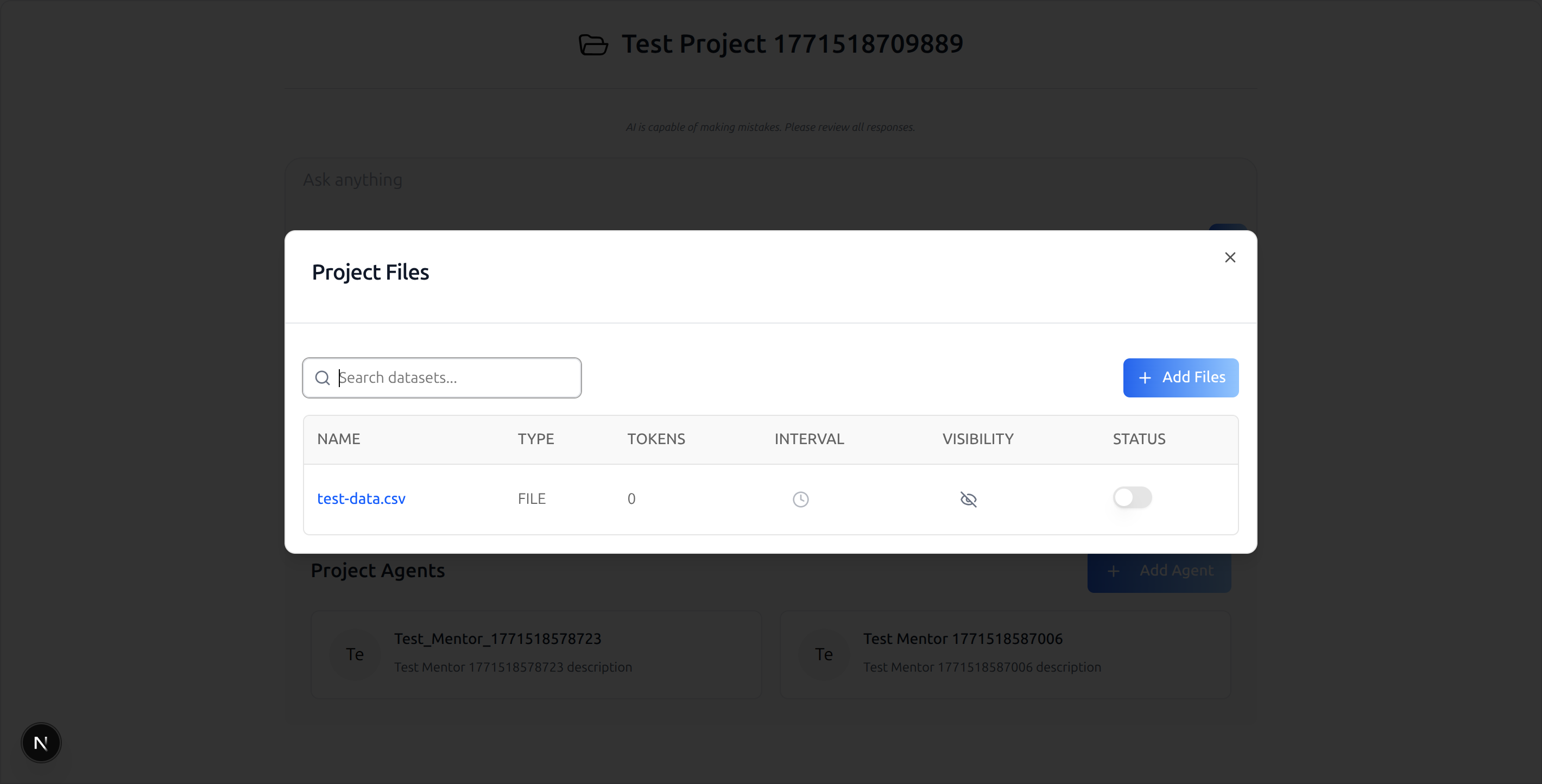
> **What you get:** a route at `/agents/[mentorId]/projects/[projectId]`
> that reads both IDs from the URL, hands them to `<Chat>`, and the SDK
> renders the project landing page (chat input + Project files / Add
> project instructions cards + Project Agents grid). Clicking "Project
> files" opens the SDK's `ProjectFilesModal`. Clicking "Add project
> instructions" opens `ProjectInstructionsModal`. "Add Agent" opens
> `AddMentorToProjectModal`.
Do NOT add custom styles, colors, or CSS overrides to the SDK
components. They ship with their own styling. Keep them as-is.
Do NOT implement dark mode unless the user explicitly asks for it.
> **Common setup (brand, conventions, env files, verification):** see
> [docs/skill-setup.md](https://raw.githubusercontent.com/iblai/vibe/refs/heads/main/docs/skill-setup.md).
## Prerequisites
This skill is a **thin delta** on top of `/iblai-agent-chat`. It does
not duplicate the provider/store/peer-dep wiring — most of the
integration cost lives over there. Run `/iblai-agent-chat` first.
- `/iblai-agent-chat` complete (providers wrapped, store reducers
registered, service worker shipped, peer deps installed). The project
surface uses the **same** `<Chat>` component, so the same wiring
applies.
- An agent/mentor ID — same as `/iblai-agent-chat`.
- A **real `projectId`** to test against. Either:
- Create one in the admin UI, or
- List the user's projects:
`GET https://api.iblai.org/dm/api/ai-mentor/orgs/<tenant>/users/<username>/projects/?limit=5`
(use `Authorization: Token <axd_token>`).
- **Minimum SDK versions.** The `projectId` prop on `<Chat>` and the
`ProjectLandingPage` slot were added in:
| package | min version |
|---|---|
| `@iblai/iblai-js` | `^1.11.0` |
| `@iblai/web-containers` | `^1.7.0` |
| `@iblai/web-utils` | `^1.7.0` |
| `@iblai/data-layer` | `^1.5.7` |
| `@iblai/agent-ai` | `^2.6.0` |
- **Pre-flight prop check (do this before writing the route):**
```bash
grep -q "projectId?: string" \
node_modules/@iblai/web-containers/dist/next/index.d.ts \
&& echo "projectId prop present" \
|| echo "MISSING — upgrade @iblai/web-containers (Step 2)"
```
## What Gets Wired
| File | Change |
|------|--------|
| `package.json` | (No new packages — already covered by `/iblai-agent-chat` if both are on the same SDK release. If the host is on an older SDK, bump to the versions above.) |
| `app/agents/[mentorId]/projects/[projectId]/page.tsx` | New route rendering `<Chat>` with `projectId={projectId}` (Step 3) |
## Step 1: Confirm `/iblai-agent-chat` is Wired
The project surface inherits **all** of `/iblai-agent-chat`'s setup.
Don't proceed until you confirm:
| Check | Command / file |
|---|---|
| Auth providers tree wrapped in `<ServiceWorkerProvider>` | `providers/index.tsx` |
| `skip={isSsoLoginRoute}` on Auth + Tenant providers | `providers/index.tsx` |
| `chat`, `chatInput`, `chatSliceShared`, `files`, `rbac`, `subscription`, `topBanner` reducers registered | `store/index.ts` |
| `public/sw.js` present | `ls public/sw.js` |
| `@iblai/agent-ai` installed | `cat node_modules/@iblai/agent-ai/package.json \| grep version` |
| `/agents/[mentorId]/chat-new` route renders for an authed user | open in browser |
If any of these fail, run `/iblai-agent-chat` first.
## Step 2: Bump the SDK if Needed
If `/iblai-agent-chat` was set up against an older SDK release, bump
the packages so `projectId` is recognized:
```bash
pnpm add @iblai/iblai-js@^1.11.0 \
@iblai/web-containers@^1.7.0 \
@iblai/web-utils@^1.7.0 \
@iblai/data-layer@^1.5.7 \
@iblai/agent-ai@^2.6.0
```
Run the **Pre-flight prop check** in *Prerequisites* to confirm
`projectId?: string` is on the `Chat` Props type.
## Step 3: Create the Route
Create `app/agents/[mentorId]/projects/[projectId]/page.tsx`:
```tsx
"use client";
export const dynamic = "force-dynamic";
import { Suspense, useEffect, useState } from "react";
import { useParams, useRouter } from "next/navigation";
import { Chat, type ChatConfig } from "@iblai/iblai-js/web-containers/next";
import {
useUsername,
useAxdToken,
useUserTenants,
useVisitingTenant,
useIsAdmin,
} from "@iblai/iblai-js/web-utils";
import { redirectToAuthSpa } from "@/lib/utils";
import { config } from "@/lib/config";
export default function AgentProjectPageWrapper() {
return (
<Suspense fallback={null}>
<AgentProjectPage />
</Suspense>
);
}
function AgentProjectPage() {
const { mentorId, projectId } = useParams<{
mentorId: string;
projectId: string;
}>();
const router = useRouter();
const [tenantKey, setTenantKey] = useState("");
useEffect(() => {
const appTenant = localStorage.getItem("app_tenant");
const tenant = localStorage.getItem("tenant");
let currentTenant = "";
try {
currentTenant =
JSON.parse(localStorage.getItem("current_tenant") ?? "{}")?.key ?? "";
} catch {}
setTenantKey(
appTenant || currentTenant || tenant || config.mainTenantKey(),
);
}, []);
const username = useUsername();
const axdToken = useAxdToken();
const { userTenants } = useUserTenants();
const { visitingTenant } = useVisitingTenant();
const isAdmin = useIsAdmin();
const chatConfig: ChatConfig = {
baseWsUrl: () => config.wsUrl(),
supportEmail: () =>
process.env.NEXT_PUBLIC_SUPPORT_EMAIL ?? "support@ibl.ai",
authUrl: () => config.authUrl(),
mainTenantKey: config.mainTenantKey(),
navigateToAdminBilling: () =>
router.push(`/agents/${mentorId}/settings?tab=billing`),
navigateToExplore: () => router.push("/agents"),
navigateToMentor: (id) => router.push(`/agents/${id}`),
};
// Gate render until all 3 IDs are available — projectId from URL,
// mentorId from URL, tenantKey from localStorage.
if (!tenantKey || !mentorId || !projectId) return null;
return (
<div className="flex h-screen w-full flex-col">
<Chat
isPreviewMode={false}
mentorId={mentorId}
tenantKey={tenantKey}
projectId={projectId} /* ← only change vs /iblai-agent-chat */
config={chatConfig}
redirectToAuthSpa={redirectToAuthSpa}
username={username ?? null}
userTenants={userTenants ?? []}
visitingTenant={visitingTenant}
axdToken={axdToken ?? ""}
userIsStudent={!isAdmin}
/>
</div>
);
}
```
**Why each piece:**
| Item | Why |
|------|-----|
| Same wrapper / Suspense / `dynamic` / `chatConfig` / hooks as `/iblai-agent-chat` | The SDK component is the same; only the `projectId` prop differs. |
| `mentorId` from `useParams<{ mentorId; projectId }>()` | Project chats are mentor-scoped — the WebSocket session still needs a mentor. |
| `projectId` from `useParams<...>()` | Triggers the SDK to render `ProjectLandingPage` instead of the default welcome surface. |
| `if (!tenantKey \|\| !mentorId \|\| !projectId) return null` | All three are required; render only when all are resolved. |
| `tenantKey` from `localStorage` (`appTenant` / `current_tenant` / `tenant` / `config.mainTenantKey()`) | Matches `/iblai-agent-chat`'s pattern. |
## What the SDK Does With `projectId`
`<Chat>` itself doesn't change shape. Internally, when `projectId` is
truthy, the bundled `WelcomeChatNew` slot switches its render branch:
- Calls `useGetUserProjectDetailsQuery({ id: parseInt(projectId) })`
- If the project resolves, renders `<ProjectLandingPage>` with the
project name, chat input, **Project files** card (opens
`ProjectFilesModal`), **Add project instructions** card (opens
`ProjectInstructionsModal`), and **Project Agents** grid (opens
`AddMentorToProjectModal` from the "Add Agent" button)
- If the project 404s, the surface renders empty — you'll see a clean
body and a `[data-layer] API error` in the console. Don't treat that
as a bug in this skill; verify the `projectId` exists for the
authenticated user/tenant.
The chat input you see in the project surface is the same chat input
as the regular `<Chat>` flow — sending a message creates a session
**scoped to this project + mentor combo** (the WebSocket URL still
uses `mentorId`).
## Props
The full `Chat` props table is in `/iblai-agent-chat`. The
project-relevant delta:
| Prop | Type | Required | Description |
|------|------|----------|-------------|
| `projectId` | `string` | no | Stringified integer matching a project the user has access to. When set, the welcome surface switches to `ProjectLandingPage`. |
| `mentorId` | `string` | yes | Still required even with `projectId` set — the chat session is mentor-scoped. |
`ChatConfig` is identical to `/iblai-agent-chat` — no project-specific
fields.
## Step 4: Verify
1. `pnpm build` — must pass with zero errors.
2. `pnpm dev`, log in, navigate to
`http://localhost:3000/agents/<mentorId>/projects/<projectId>`.
3. You should see:
- The project name as the page heading (folder icon next to it)
- "AI is capable of making mistakes…" disclaimer
- "Ask anything" chat input with the standard action buttons (Canvas,
Prompts, voice, screen-share, send) + Web Search toggle
- "Project files" card showing "N files added"
- "Add project instructions" card
- "Project Agents" section with the assigned mentor cards and an
"Add Agent" button
4. Click "Project files" → SDK's `ProjectFilesModal` opens with the
datasets table.
5. Open `/agents/<mentorId>/projects/<bad-id>` to confirm graceful 404
handling (empty body + data-layer console error, no app crash).
If the project surface renders but the chat WebSocket can't connect,
that's a backend issue (LLM config on the mentor) — see
`/iblai-agent-chat`'s **Known issues**.
## CLI Integration (proposal — not yet implemented)
A future `iblai add projects` command should:
1. **Verify `/iblai-agent-chat` is wired** — refuse to run if the
provider/store/peer-dep setup isn't in place. Point the user at
`iblai add agent-chat` first.
2. **Bump the SDK** if it's pinned below the versions in *Prerequisites*.
3. **Scaffold the route** — write
`app/agents/[mentorId]/projects/[projectId]/page.tsx` parameterized
on the host's existing `redirectToAuthSpa` and `config` helpers.
4. **Skip if already added** — detect the existing route file and
no-op.
The generator should not regenerate `/iblai-agent-chat` artifacts —
the two skills compose (the project surface needs the agent-chat
wiring already done).
**Brand guidelines**: [BRAND.md](https://raw.githubusercontent.com/iblai/vibe/refs/heads/main/BRAND.md)