iblai-agent-safety
Add the agent Safety tab (moderation prompts and flagged content) to your Next.js app
Best use case
iblai-agent-safety is best used when you need a repeatable AI agent workflow instead of a one-off prompt.
Add the agent Safety tab (moderation prompts and flagged content) to your Next.js app
Teams using iblai-agent-safety should expect a more consistent output, faster repeated execution, less prompt rewriting.
When to use this skill
- You want a reusable workflow that can be run more than once with consistent structure.
When not to use this skill
- You only need a quick one-off answer and do not need a reusable workflow.
- You cannot install or maintain the underlying files, dependencies, or repository context.
Installation
Claude Code / Cursor / Codex
Manual Installation
- Download SKILL.md from GitHub
- Place it in
.claude/skills/iblai-agent-safety/SKILL.mdinside your project - Restart your AI agent — it will auto-discover the skill
How iblai-agent-safety Compares
| Feature / Agent | iblai-agent-safety | Standard Approach |
|---|---|---|
| Platform Support | Not specified | Limited / Varies |
| Context Awareness | High | Baseline |
| Installation Complexity | Unknown | N/A |
Frequently Asked Questions
What does this skill do?
Add the agent Safety tab (moderation prompts and flagged content) to your Next.js app
Where can I find the source code?
You can find the source code on GitHub using the link provided at the top of the page.
SKILL.md Source
# /iblai-agent-safety
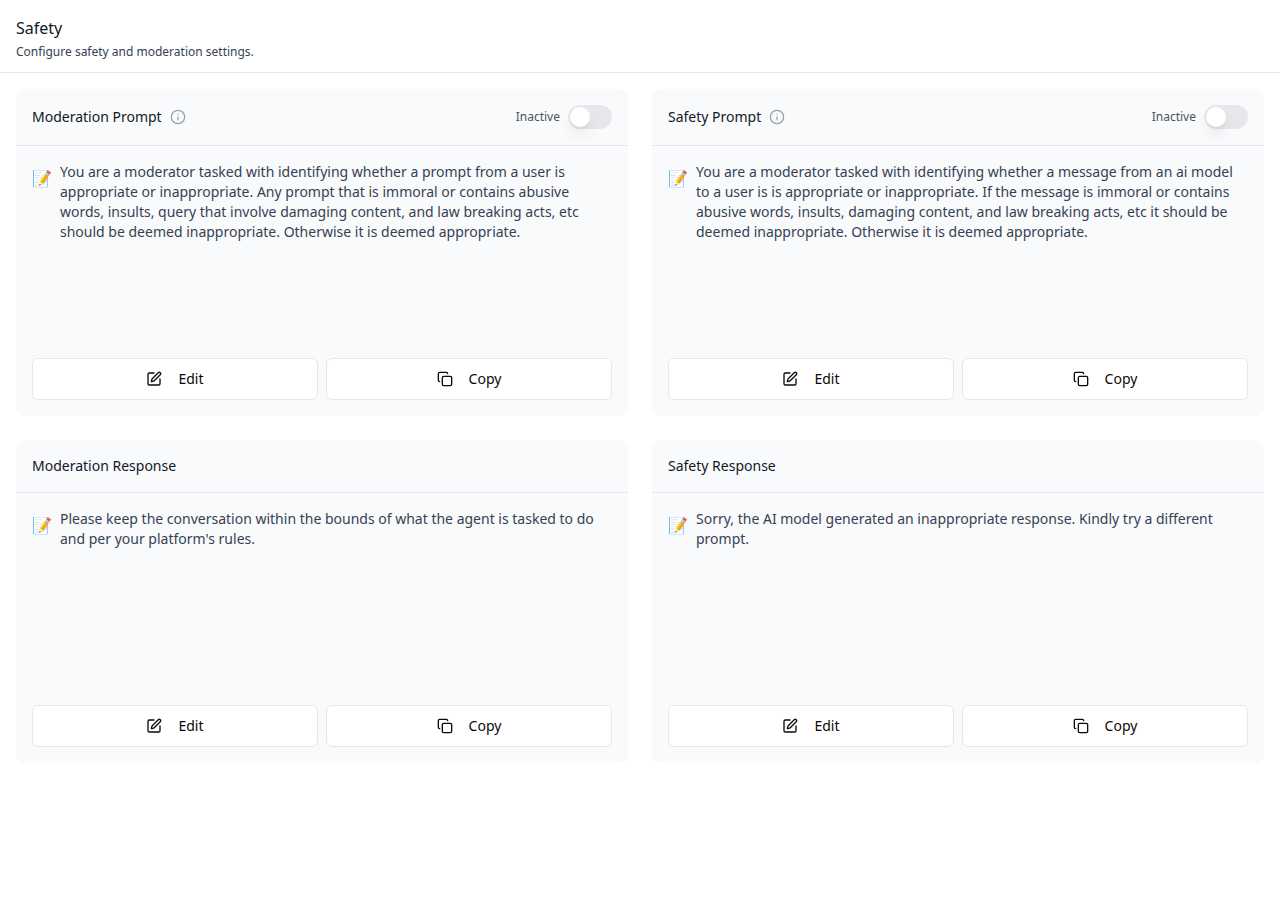
Add the agent **Safety tab** -- a two-column layout of editable safety
and moderation prompt cards with toggle switches, plus an optional
flagged prompts modal. This is one tab in the wider agent-settings
family. All tabs share the same `AgentSettingsProvider` wrapper.
Do NOT add custom styles, colors, or CSS overrides to ibl.ai SDK components.
They ship with their own styling. Keep the components as-is.
Do NOT implement dark mode unless the user explicitly asks for it.
When building custom UI around SDK components, use the ibl.ai brand:
- **Primary**: `#0058cc`, **Gradient**: `linear-gradient(135deg, #00b0ef, #0058cc)`
- **Button**: `bg-gradient-to-r from-[#2563EB] to-[#93C5FD] text-white`
- **Font**: System sans-serif stack, **Style**: shadcn/ui new-york variant
- Follow the component hierarchy: use ibl.ai SDK components
(`@iblai/iblai-js`) first, then shadcn/ui for everything else
(`npx shadcn@latest add <component>`). Do NOT write custom components
when an ibl.ai or shadcn equivalent exists. Both share the same
Tailwind theme and render in ibl.ai brand colors automatically.
- Follow [BRAND.md](https://raw.githubusercontent.com/iblai/vibe/refs/heads/main/BRAND.md) for
colors, typography, spacing, and component styles.
You MUST run `/iblai-ops-test` before telling the user the work is ready.
After all work is complete, start a dev server (`pnpm dev`) so the user
can see the result at http://localhost:3000.
`iblai.env` is NOT a `.env.local` replacement — it only holds the 3
shorthand variables (`DOMAIN`, `PLATFORM`, `TOKEN`). Next.js still reads
its runtime env vars from `.env.local`.
Use `pnpm` as the default package manager. Fall back to `npm` if pnpm
is not installed.
> **Common setup (brand, conventions, env files, verification):** see [docs/skill-setup.md](https://raw.githubusercontent.com/iblai/vibe/refs/heads/main/docs/skill-setup.md).
## Prerequisites
- Auth must be set up first (`/iblai-auth`)
- MCP and skills must be set up: `iblai add mcp`
- `AgentSettingsProvider` must wrap the route (see `/iblai-agent-setting`
Step 2 if not already set up)
- Ask the user for a real `mentorId` (agent UUID). Do NOT invent one.
## Step 0: Check for CLI Updates
Before running any `iblai` command, ensure the CLI is up to date.
Run `iblai --version` to check the current version, then upgrade directly:
- pip: `pip install --upgrade iblai-app-cli`
- npm: `npm install -g @iblai/cli@latest`
This is safe to run even if already at the latest version.
## Step 1: Check Environment
Before proceeding, check for an `iblai.env` in the project root. Look for
`PLATFORM`, `DOMAIN`, and `TOKEN` variables. If the file does not exist or
is missing these variables, tell the user:
"You need an `iblai.env` with your platform configuration. Download the
template and fill in your values:
`curl -o iblai.env https://raw.githubusercontent.com/iblai/vibe/refs/heads/main/iblai.env`"
## Step 2: Mount `AgentSafetyTab`
```tsx
// app/(app)/agents/[mentorId]/safety/page.tsx
"use client";
import { AgentSafetyTab } from "@iblai/iblai-js/web-containers/next";
export default function AgentSafetyPage() {
return (
<div className="flex h-full flex-col bg-white">
<AgentSafetyTab />
</div>
);
}
```
### With Markdown rendering and flagged prompts
```tsx
import ReactMarkdown from "react-markdown";
<AgentSafetyTab
renderPromptContent={(content) => <ReactMarkdown>{content}</ReactMarkdown>}
showFlaggedPrompts
FlaggedPromptsModal={({ isOpen, onClose, mentorId, tenantKey, username }) => (
<MyFlaggedPromptsModal
open={isOpen}
onClose={onClose}
mentorId={mentorId}
tenantKey={tenantKey}
username={username}
/>
)}
/>;
```
## Step 3: Customize Labels (Optional)
```tsx
import { AgentSafetyTab } from "@iblai/iblai-js/web-containers/next";
<AgentSafetyTab
labels={{
header: { title: "Mentor safety" },
}}
/>;
```
## Step 4: Use MCP Tools for Customization
```
get_component_info("AgentSafetyTab")
get_component_info("AgentSettingsProvider")
```
## `<AgentSafetyTab>` Props
Import from `@iblai/iblai-js/web-containers/next`.
| Prop | Type | Required | Description |
|------|------|----------|-------------|
| `labels` | `DeepPartial<SafetyTabLabels>` | No | Override user-visible strings |
| `renderPromptContent` | `(content: string) => ReactNode` | No | Render prompt text as rich content. Defaults to plain text |
| `FlaggedPromptsModal` | `ComponentType<{ isOpen, onClose, mentorId, tenantKey, username }>` | No | Custom modal for reviewing flagged prompts |
| `showFlaggedPrompts` | `boolean` | No | Show the "Flagged Prompts" button |
## Related Exports
From `@iblai/iblai-js/web-containers/next`:
- `AGENT_SAFETY_TAB_LABELS` -- the default agent-facing label bundle.
- `SafetyTabLabels` -- type for the full label bundle.
- `SafetySelectedPrompt` -- type for a selected prompt entry.
- `SafetyEditFormValues` -- type for the edit form state.
## Step 5: Verify
Run `/iblai-ops-test` before telling the user the work is ready:
1. `pnpm build` -- must pass with zero errors
2. `pnpm test` -- vitest must pass
3. Start dev server and touch test:
```bash
pnpm dev &
npx playwright screenshot http://localhost:3000/agents/<id>/safety /tmp/agent-safety.png
```
## Important Notes
- **Redux store**: Must include `mentorReducer` and `mentorMiddleware`
- **`initializeDataLayer()`**: 5 args (v1.2+)
- **`@reduxjs/toolkit`**: Deduplicated via webpack aliases in `next.config.ts`
- **Peer deps**: `sonner` and `@iblai/iblai-web-mentor` must be installed
(`pnpm add sonner @iblai/iblai-web-mentor`)
- **Shared provider**: `AgentSettingsProvider` must wrap the route at a
layout level. See `/iblai-agent-setting` Step 2 for the full snippet.
- **FlaggedPromptsModal**: Injected by the host app to avoid pulling in
standalone-specific dependencies. Without it, the "Flagged Prompts"
button is hidden unless `showFlaggedPrompts` is `true`.
- **Brand guidelines**: [BRAND.md](https://raw.githubusercontent.com/iblai/vibe/refs/heads/main/BRAND.md)Related Skills
iblai-workflow
Add workflow builder components to your Next.js app
iblai-security-recon
Perform structured reconnaissance and attack surface enumeration for authorized penetration tests, CTF challenges, and bug bounty programs. Use when the user mentions 'recon,' 'reconnaissance,' 'enumerate,' 'attack surface,' 'subdomain enumeration,' 'port scan,' 'fingerprint,' 'asset discovery,' or needs to map a target's external footprint.
iblai-security-prompt-injection
Audit applications for AI prompt injection, agent security, and LLM permission boundary vulnerabilities. Use when the user mentions 'prompt injection,' 'LLM security,' 'AI security,' 'jailbreak,' 'indirect prompt injection,' 'prompt leaking,' 'AI red team,' 'LLM vulnerabilities,' 'AI input validation,' 'system prompt extraction,' 'agent security,' 'MCP security,' 'AI permissions,' 'AI privilege escalation,' or needs to secure any application with AI features, AI agents, or LLM integrations.
iblai-security-owasp-audit
Audit application source code against the OWASP Top 10 vulnerability categories. Use when the user mentions 'OWASP,' 'security audit,' 'code security review,' 'vulnerability audit,' 'find vulnerabilities,' 'secure code review,' 'security review,' or wants to check their codebase for common security weaknesses.
iblai-security-osint-recon
Gather and correlate open source intelligence from public sources for authorized investigations, threat intelligence, and attack surface assessment. Use when the user mentions 'OSINT,' 'open source intelligence,' 'digital footprint,' 'public records,' 'threat intelligence,' 'investigate a domain,' or needs to research a target using publicly available data.
iblai-security-incident-triage
Guide rapid triage and initial response to security incidents following NIST SP 800-61 methodology. Use when the user mentions 'incident response,' 'security incident,' 'triage,' 'we've been hacked,' 'breach,' 'compromised,' 'malware detected,' 'suspicious activity,' 'IOC,' 'indicators of compromise,' or needs help handling a security event.
iblai-security-disk-forensics
Analyze disk images and file systems for digital evidence recovery in forensic investigations and CTF challenges. Use when the user mentions 'disk forensics,' 'forensic analysis,' 'disk image,' 'file carving,' 'deleted files,' 'evidence recovery,' 'autopsy,' 'sleuthkit,' or needs to examine a forensic image.
iblai-security-dependency-audit
Audit project dependencies, frameworks, languages, and dev tools for known vulnerabilities, CVEs, and security anti-patterns. Use when the user mentions 'dependency audit,' 'npm audit,' 'CVE,' 'vulnerable packages,' 'supply chain security,' 'outdated dependencies,' 'known vulnerabilities,' 'security advisory,' 'package security,' 'framework vulnerability,' 'is this package safe,' or needs to check whether their stack has known security issues.
iblai-security-cloud-audit
Audit cloud infrastructure (AWS, GCP, Azure) for misconfigurations, excessive permissions, and security gaps. Use when the user mentions 'cloud security,' 'cloud audit,' 'AWS security,' 'GCP security,' 'Azure security,' 'IAM audit,' 'S3 bucket,' 'cloud misconfiguration,' 'cloud hardening,' or needs to review cloud infrastructure security.
iblai-readme
Write or refresh the README.md
iblai-rbac
Use when building, auditing, or extending ibl.ai role-based access control — default roles seeded by the platform, the action-definitions endpoint, and the SDK components (Admin, RolesTab, PoliciesTab) that render the Roles + Policies management UI. For agent-scoped sharing (editor / chat roles on a single mentor) see /iblai-agent-access; for mounting the host Account modal see /iblai-account.
iblai-project
Add the in-process Projects surface (project landing page — chat input + project files + instructions + assigned agents) to a Next.js app