iblai-course-create
Use this skill when a user asks to create, draft, scaffold, generate, or publish a course on ibl.ai / OpenEdX — including programmatic outlines, unit/component generation, or edits to an AI-generated course. Invoke to drive the ibl.ai Course Creation API end-to-end: create the task, build the course on EdX, generate the outline, draft unit content, review/edit structure, and publish. Do NOT invoke for enrollment, grading, mentor configuration, or analytics queries — those are handled by other skills.
Best use case
iblai-course-create is best used when you need a repeatable AI agent workflow instead of a one-off prompt.
Use this skill when a user asks to create, draft, scaffold, generate, or publish a course on ibl.ai / OpenEdX — including programmatic outlines, unit/component generation, or edits to an AI-generated course. Invoke to drive the ibl.ai Course Creation API end-to-end: create the task, build the course on EdX, generate the outline, draft unit content, review/edit structure, and publish. Do NOT invoke for enrollment, grading, mentor configuration, or analytics queries — those are handled by other skills.
Teams using iblai-course-create should expect a more consistent output, faster repeated execution, less prompt rewriting.
When to use this skill
- You want a reusable workflow that can be run more than once with consistent structure.
When not to use this skill
- You only need a quick one-off answer and do not need a reusable workflow.
- You cannot install or maintain the underlying files, dependencies, or repository context.
Installation
Claude Code / Cursor / Codex
Manual Installation
- Download SKILL.md from GitHub
- Place it in
.claude/skills/iblai-course-create/SKILL.mdinside your project - Restart your AI agent — it will auto-discover the skill
How iblai-course-create Compares
| Feature / Agent | iblai-course-create | Standard Approach |
|---|---|---|
| Platform Support | Not specified | Limited / Varies |
| Context Awareness | High | Baseline |
| Installation Complexity | Unknown | N/A |
Frequently Asked Questions
What does this skill do?
Use this skill when a user asks to create, draft, scaffold, generate, or publish a course on ibl.ai / OpenEdX — including programmatic outlines, unit/component generation, or edits to an AI-generated course. Invoke to drive the ibl.ai Course Creation API end-to-end: create the task, build the course on EdX, generate the outline, draft unit content, review/edit structure, and publish. Do NOT invoke for enrollment, grading, mentor configuration, or analytics queries — those are handled by other skills.
Where can I find the source code?
You can find the source code on GitHub using the link provided at the top of the page.
SKILL.md Source
# /iblai-course-create
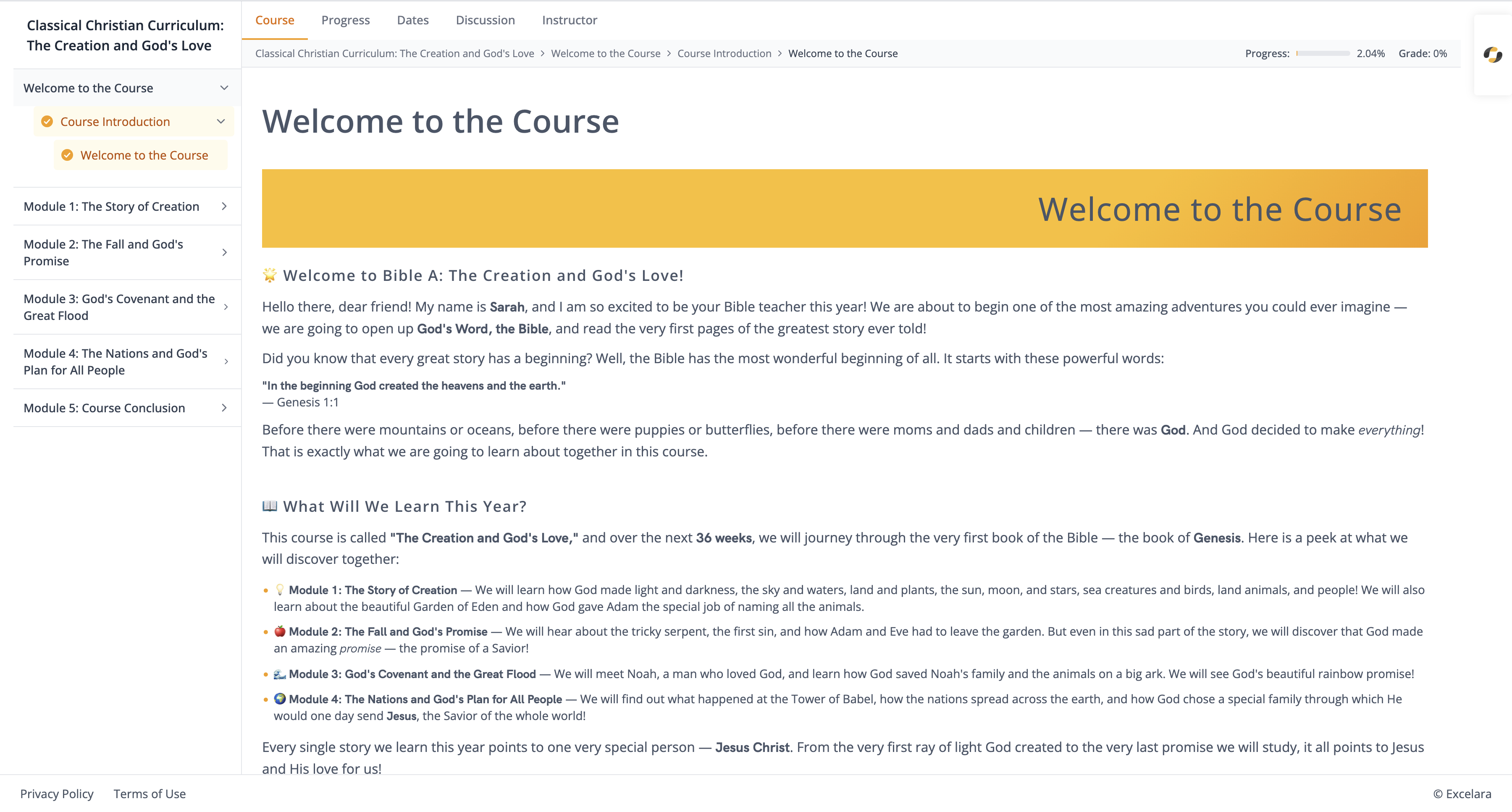
## Overview
This skill drives the IBL.AI Course Creation API to programmatically produce courses on an OpenEdX deployment. The API combines AI-generated structure (sections → subsections → units → components) with direct EdX writes, so **EdX is the single source of truth** for every structural operation. There are no intermediate database models for sections, subsections, units, or components — the API proxies every read/write to EdX.
Two workflow styles are supported:
1. **Stepwise (recommended for agents)** — create the task, create the empty course on EdX, generate the outline, review, edit structure if needed, draft unit content, verify, publish.
2. **Automated pipeline** — one call (`/start/`) runs the entire pipeline as a background Celery task; the agent polls for completion.
Prefer stepwise when the agent (or a user) wants to review or modify intermediate output. Prefer the pipeline when the brief is tight and no human-in-the-loop review is expected.
## Configuration
All endpoints are rooted at:
```
{base_url}/api/ai-mentor/orgs/{org}/users/{user_id}/
```
| Variable | Purpose | Env var |
| ----------- | -------------------------------------------------- | ----------------- |
| `base_url` | Server URL (e.g. `https://base.manager.iblai.app`) | `IBLAI_BASE_URL` |
| `org` | Platform / tenant key | `IBLAI_ORG` |
| `user_id` | Authenticated user's username | `IBLAI_USER_ID` |
| `api_key` | API token used as `Authorization: Token <api_key>` | `IBLAI_API_KEY` |
| `mentor_id` | (Optional) Mentor UUID for memory-aware generation | `IBLAI_MENTOR_ID` |
Every request MUST include:
```
Authorization: Token {api_key}
Content-Type: application/json (for JSON bodies)
```
## EdX Block Hierarchy (critical)
```
Course
└── Section (chapter)
└── Subsection (sequential)
└── Unit (vertical)
└── Component (html | problem | video)
```
Each block has an `xblock_id` EdX locator:
```
block-v1:{org}+{course}+{run}+type@{type}+block@{slug}
```
The segment `type@<type>` identifies the block kind: `course`, `chapter`, `sequential`, `vertical`, `html`, `problem`, `video`. Parent/child relationships are enforced by the API:
| Child | Valid parent |
| ---------- | ------------ |
| section | course |
| subsection | section |
| unit | subsection |
| html | unit |
| problem | unit |
| video | unit |
Violating hierarchy returns `400`.
What the generated course looks like in edX Studio (course outline and a single unit with components):
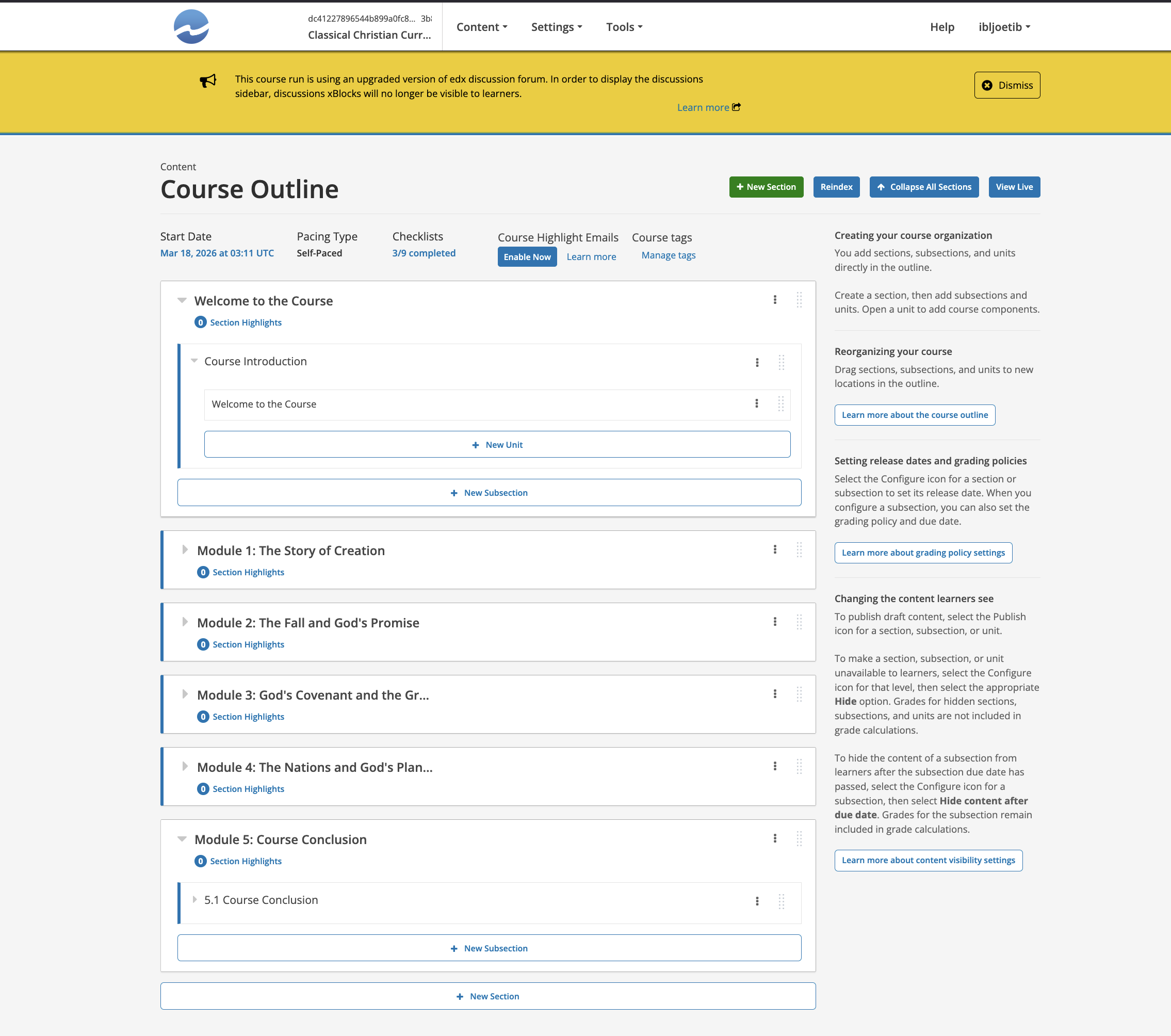
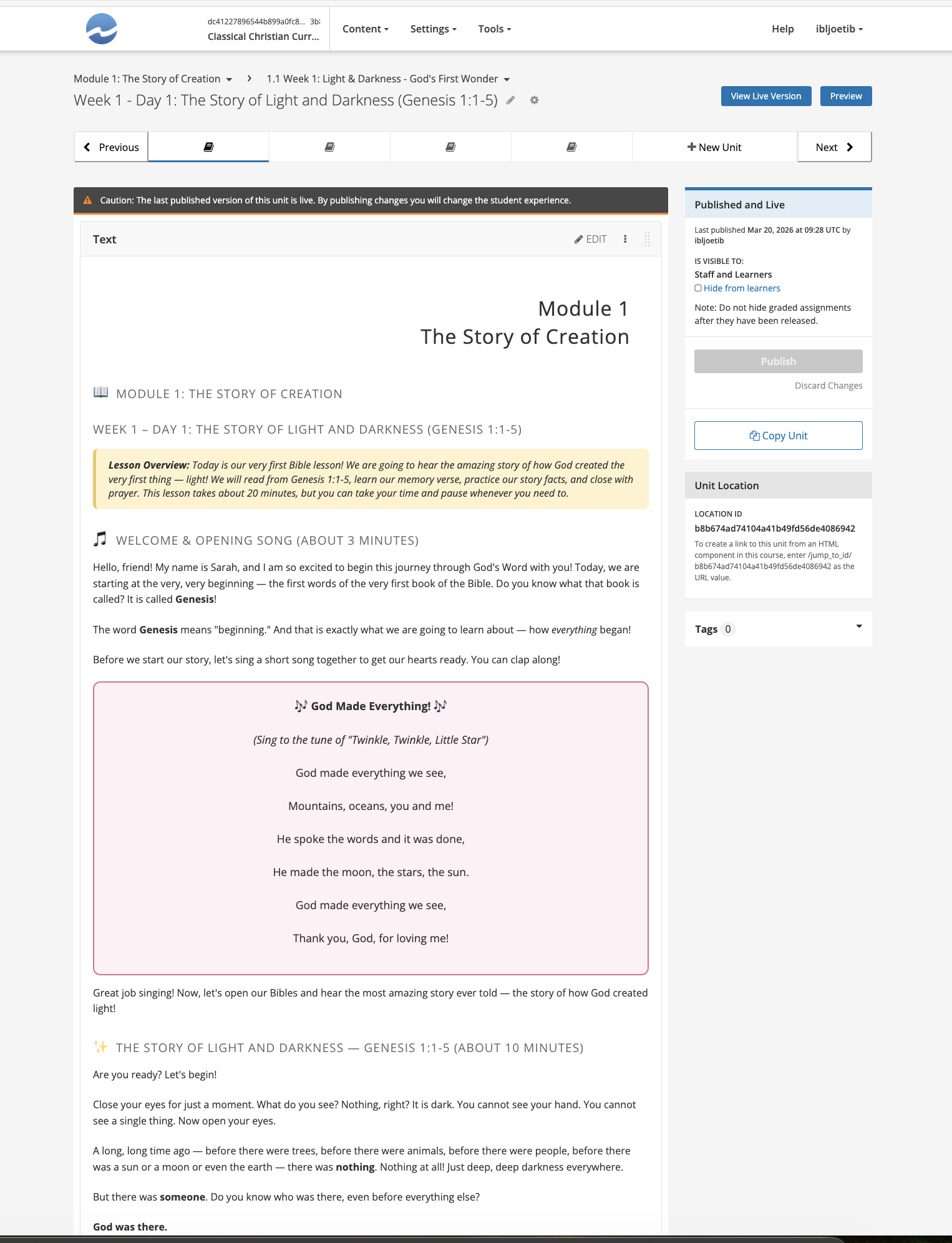
## Task Lifecycle
A `CourseCreationTask` stores the generation brief and tracks progress. Its `status` transitions:
```
Pending → Scheduled → In Progress → Success | Failed | Cancelled
```
- `Pending` after `POST /tasks/`
- `Scheduled` after `GET /tasks/{id}/start/`
- `In Progress` while the Celery worker runs
- `Success` once the outline + content + publish have all completed
- `Failed` on any unrecoverable error (check task detail for `error` / `reason`)
## Primary Endpoints
All paths below are appended to the base root `{base_url}/api/ai-mentor/orgs/{org}/users/{user_id}/`.
### Task endpoints
| Action | Method | Path |
| --------------------- | ------ | -------------------------------------------------------- |
| Create task | POST | `course-creation/tasks/` |
| List tasks | GET | `course-creation/tasks/` |
| Task detail / status | GET | `course-creation/tasks/{task_id}/` |
| Delete task | DELETE | `course-creation/tasks/{task_id}/` |
| Create course on EdX | POST | `course-creation/tasks/{task_id}/create-course/` |
| Generate outline (AI) | POST | `course-creation/tasks/{task_id}/create-course-outline/` |
| Start full pipeline | GET | `course-creation/tasks/{task_id}/start/` |
| Cancel pipeline | GET | `course-creation/tasks/{task_id}/cancel/` |
### Course endpoints
| Action | Method | Path |
| ------------------------------ | ------ | --------------------------------------------------------------------------------- |
| List courses | GET | `course-creation/course/` |
| Course by task | GET | `course-creation/course/?task={task_id}` |
| Course detail | GET | `course-creation/course/{course_id}/` |
| Delete course record | DELETE | `course-creation/course/{course_id}/` |
| Outline (no component content) | GET | `course-creation/course/{course_id}/outline/` |
| Full structure | GET | `course-creation/course/{course_id}/full-structure/` |
| Full structure + HTML | GET | `course-creation/course/{course_id}/full-structure/?include_content=true` |
| Draft content for all units | GET | `course-creation/course/{course_id}/draft-content-for-all-units/` |
| Draft content for one unit | POST | `course-creation/course/{course_id}/draft-content-for-unit/` |
| Create xblock | POST | `course-creation/course/{course_id}/create-xblock/` |
| Update xblock | POST | `course-creation/course/{course_id}/update-xblock/` |
| Delete xblock | POST | `course-creation/course/{course_id}/delete-xblock/` |
| Reorder children | POST | `course-creation/course/{course_id}/reorder-children/` |
| Publish to EdX | POST | `course-creation/course/{course_id}/sync-to-edx/` |
| Student progress | GET | `course-creation/course/{course_id}/student-progress/?target_username={username}` |
### File endpoints
| Action | Method | Path |
| ----------- | ------ | ------------------------------------ |
| Upload file | POST | `course-creation/files/` (multipart) |
| List files | GET | `course-creation/files/` |
| Delete file | DELETE | `course-creation/files/{id}/` |
## Request Payloads
### Create task (`POST /course-creation/tasks/`)
```json
{
"name": "Introduction to Python Programming",
"description": "A beginner-friendly course covering Python fundamentals: variables, primitive data types, control flow (if/else, for, while), functions, error handling, and basic data structures (lists, tuples, dicts, sets). Emphasize hands-on coding with small, runnable exercises. Avoid object-oriented programming — that belongs in a follow-up course.",
"target_audience": "First-year undergraduates with no prior programming experience. English is a second language for ~40% of the cohort.",
"publish_course": true,
"provider": "openai",
"model": "gpt-4o-mini",
"desired_number_of_sections": 4
}
```
| Field | Required | Default | Notes |
| ---------------------------- | -------- | --------------- | ------------------------------------------------------------------------------ |
| `name` | Yes | — | Course display name |
| `description` | Yes | — | Detailed scope — see **Writing the description** below |
| `target_audience` | Yes | — | Learner profile |
| `publish_course` | No | `true` | Auto-publish on sync |
| `provider` | No | `"openai"` | LLM provider |
| `model` | No | `"gpt-4o-mini"` | Larger models give better structure; `gpt-4o` or `gpt-4.1` for complex courses |
| `desired_number_of_sections` | No | `4` | 3–6 is typical; higher values produce thinner sections |
### Create xblock (`POST /course-creation/course/{course_id}/create-xblock/`)
```json
{
"parent_xblock_id": "<parent locator>",
"xblock_type": "section | subsection | unit | html | problem | video",
"display_name": "Readable title",
"content": "<optional, only for html/problem/video>",
"position": "last"
}
```
`html` content is HTML. `problem` content is EdX OLX problem XML. `video` accepts HTML wrapping a video embed.
### Update xblock
```json
{
"xblock_id": "<locator>",
"display_name": "Optional new title",
"content": "<optional, only for html/problem>"
}
```
Omit either field to leave it unchanged. Sending neither returns `400`.
### Delete xblock
```json
{ "xblock_id": "<locator>" }
```
Deletions cascade (section → subsections → units → components) and are **irreversible**.
### Reorder children
```json
{
"xblock_id": "<parent locator>",
"children": ["<child locator 1>", "<child locator 2>", "..."]
}
```
You **must list every current child**. To move a block to a different parent, include it in the new parent's `children` array — EdX will detach it from its former parent automatically.
## Recommended Workflow (Stepwise)
```
1. POST /course-creation/tasks/ → task_id
2. POST /course-creation/tasks/{task_id}/create-course/ → course_id, course xblock_id
3. POST /course-creation/tasks/{task_id}/create-course-outline/ → sections/subsections/units on EdX
4. GET /course-creation/course/{course_id}/full-structure/ → review generated structure
5. (Optional) create/update/delete/reorder xblocks to fix the outline
6. GET /course-creation/course/{course_id}/draft-content-for-all-units/ → background content drafting
7. Poll /full-structure/?include_content=true until every unit has components
8. (Optional) update individual components via /update-xblock/
9. POST /course-creation/course/{course_id}/sync-to-edx/ → publish
```
### Polling for content completion
`/draft-content-for-all-units/` is asynchronous. Poll either the task status (`GET /tasks/{task_id}/`) or re-fetch `/full-structure/?include_content=true` and check that every unit's `components` array is non-empty. A typical course (3–5 sections, ~15 units) takes 1–3 minutes.
Back-off pattern: start at 20s, double up to 120s, cap at 5 minutes total wait before surfacing a timeout to the user.
## Alternative: Fully Automated Pipeline
```
1. POST /course-creation/tasks/ → task_id
2. GET /course-creation/tasks/{task_id}/start/
3. Poll /course-creation/tasks/{task_id}/ → wait for status == "Success"
4. GET /course-creation/course/?task={task_id}→ resolve course_id
```
Use this only when the user explicitly asks for a "one-shot" course and does not want to approve the outline.
## File Attachments (reference material)
Upload up to **4 files**, **20 MB each**, via multipart to `/course-creation/files/`:
```
POST /course-creation/files/
Content-Type: multipart/form-data
course_creation_task=<task_id>
file=<binary>
```
Supported content: PDFs, Word docs, Markdown, plain text, slide decks. The AI uses these as reference when generating outline and unit content. Upload files **before** calling `create-course-outline` or `start` — files attached later are ignored.
## Best Practices for Writing the Course Brief
The quality of `description` and `target_audience` dominates output quality. Before calling `POST /tasks/`, draft the brief following the template below. If the user's brief is vague, **ask clarifying questions first** — do not send an underspecified task, because outline regeneration is wasteful.
### The 5-field brief template
1. **Subject & scope** — what is in, and (explicitly) what is out.
2. **Learning outcomes** — 3–7 verbs-as-outcomes ("by the end, learners can _build_, _diagnose_, _compare_…").
3. **Target audience** — prior knowledge, language level, motivation, typical study time/week.
4. **Pedagogy** — tutorial vs. project-based vs. assessment-heavy; how much theory vs. practice.
5. **Format constraints** — number of sections, approximate length, any required topics.
### Good vs. weak briefs
**Weak** (produces generic, thin course):
> `description`: "A course on Python."
> `target_audience`: "Beginners."
**Strong** (produces coherent, teachable course):
> `description`: "A project-based introduction to Python 3.11 focused on data-wrangling for non-engineers. Cover variables, control flow, functions, file I/O, and the csv + json modules. Every section ends with a mini-project using a realistic dataset (airline delays, climate records). Exclude object-oriented programming, decorators, async, and type hints — a follow-up course covers those. Use an encouraging, low-jargon tone."
> `target_audience`: "Working analysts (marketing, ops, journalism) with spreadsheet fluency but no programming background. ~4 hours/week, 6 weeks total."
### Refinement rules (apply _before_ submitting the task)
- **State exclusions explicitly.** LLMs over-include. Saying "do not cover OOP" is more effective than listing only what to include.
- **Convert vague adjectives into measurable ones.** "Beginner" → "assumes high-school algebra, no coding"; "advanced" → "assumes 2+ years professional experience with X".
- **Name the artefact type.** "Tutorial course with hands-on exercises", "exam-prep course with graded quizzes after every subsection", "capstone course culminating in a single graded project".
- **Right-size `desired_number_of_sections`.** 3 = short workshop, 4–5 = term course, 6–8 = bootcamp. Going above 8 usually produces weak sections.
- **Pick the model to match complexity.** `gpt-4o-mini` is fine for most intro courses; use `gpt-4o` / `gpt-4.1` when the description mentions formal reasoning, technical depth (graduate-level math, law, medicine), or multiple cross-referenced modules.
- **Attach reference files for domain specificity.** If the course must align with a textbook, syllabus, curriculum standard, or style guide, upload it. One good PDF outperforms several paragraphs of description.
### Clarifying-question checklist
If any of these is unknown after the user's initial brief, ask before creating the task:
1. Who is the learner? (background + motivation)
2. What should they be able to _do_ by the end?
3. How long is the course? (weeks, sections, hours)
4. Tutorial, assessment-heavy, or project-based?
5. Any topics to exclude or must-cover topics?
6. Reference material to upload?
7. Publish immediately or keep in draft?
## Reviewing AI Output
After the outline (step 3) and again after content drafting (step 6), always pull `/full-structure/?include_content=true` and verify:
- **Every unit has ≥1 component.** Empty units are a drafting failure — re-run `draft-content-for-unit` for that locator.
- **Section/subsection titles are non-redundant.** LLMs sometimes produce "Introduction" as both section 1 and section 1's first subsection — rename via `update-xblock`.
- **Assessment problems have valid OLX.** Open the `content` field; it must contain a `<problem>…</problem>` wrapper with at least one response input. Malformed OLX silently fails on publish.
- **HTML components don't leak prompts.** Look for telltale phrases ("As an AI…", "Here is the lesson…"). If found, re-draft that unit.
- **Total length is coherent.** A course targeted at 4 hours/week for 6 weeks should have roughly 24 units of substantive content; adjust by adding/removing sections.
## Curl Recipes
```bash
export BASE=https://base.manager.iblai.app/api/ai-mentor/orgs/$IBLAI_ORG/users/$IBLAI_USER_ID
export AUTH="Authorization: Token $IBLAI_API_KEY"
# 1. Create task
TASK_ID=$(curl -s -X POST "$BASE/course-creation/tasks/" \
-H "$AUTH" -H "Content-Type: application/json" \
-d '{
"name": "Intro to Python for Analysts",
"description": "Project-based intro ... (full brief)",
"target_audience": "Working analysts ...",
"desired_number_of_sections": 5,
"provider": "openai",
"model": "gpt-4o"
}' | jq -r .id)
# 2. Create blank course on EdX
RESP=$(curl -s -X POST "$BASE/course-creation/tasks/$TASK_ID/create-course/" -H "$AUTH")
COURSE_ID=$(echo "$RESP" | jq -r .course_id)
COURSE_XBLOCK=$(echo "$RESP" | jq -r .xblock_id)
# 3. Generate outline (synchronous)
curl -s -X POST "$BASE/course-creation/tasks/$TASK_ID/create-course-outline/" -H "$AUTH"
# 4. Review outline
curl -s "$BASE/course-creation/course/$COURSE_ID/full-structure/" -H "$AUTH" | jq
# 5. Edit: add a bonus section
curl -s -X POST "$BASE/course-creation/course/$COURSE_ID/create-xblock/" \
-H "$AUTH" -H "Content-Type: application/json" \
-d "{\"parent_xblock_id\":\"$COURSE_XBLOCK\",\"xblock_type\":\"section\",\"display_name\":\"Bonus: Working with APIs\"}"
# 6. Draft all unit content (async)
curl -s "$BASE/course-creation/course/$COURSE_ID/draft-content-for-all-units/" -H "$AUTH"
# 7. Poll until content appears
until [ "$(curl -s "$BASE/course-creation/course/$COURSE_ID/full-structure/?include_content=true" \
-H "$AUTH" | jq '[.. | .components? // empty | length] | min')" != "0" ]; do
sleep 30
done
# 8. Publish
curl -s -X POST "$BASE/course-creation/course/$COURSE_ID/sync-to-edx/" -H "$AUTH"
```
## Error Handling
| Symptom | Likely cause | Remedy |
| --------------------------------------------------------- | ----------------------------------------------- | ------------------------------------------------------------------------ |
| `create-course` returns 200 (not 201) | Course already exists for this task | Re-use returned `course_id`; a settings re-apply has been scheduled. |
| `create-course-outline` returns 400 | Outline LLM call failed (rate limit, bad brief) | Check `detail`; refine description and retry, or switch to bigger model. |
| `create-xblock` returns 400 "invalid parent" | Hierarchy violation | Confirm the parent `type@` segment matches required parent type. |
| `sync-to-edx` returns 400 "no task associated" | Course record lost its task link | Recreate via the task's `create-course` endpoint. |
| Task stuck in `In Progress` for > 15 min | Celery worker stalled or LLM timeout | `GET .../cancel/`, then restart with `GET .../start/`. |
| `draft-content-for-unit` succeeds but content looks empty | Component created without body | Re-draft; if persistent, update component manually via `update-xblock`. |
## Guardrails
- **Never publish without review.** Always fetch `/full-structure/?include_content=true` and confirm with the user before calling `sync-to-edx` — published EdX courses are visible to enrolled students and costly to retract.
- **Don't mass-delete.** `delete-xblock` on a section is irreversible and cascades. Confirm target before calling.
- **Respect file limits.** Max 4 files per task, 20 MB each. Over-limit uploads are rejected with 400.
- **Tenant isolation.** `org` and `user_id` must match the authenticated user's platform and username — cross-tenant requests return 403. Do not attempt to create courses in a tenant different from the caller's.
- **Do not leak the API key.** Treat `api_key` as a bearer secret; never echo it in responses, logs, or committed files.
- **Background tasks can fail silently to the caller.** After `/start/` or `/draft-content-for-all-units/`, always verify downstream (status polling, full-structure fetch) rather than trusting the 202/200 response.
- **Ask before picking a larger/more expensive model.** `gpt-4o`/`gpt-4.1` cost materially more than `gpt-4o-mini`. Confirm with the user when complexity warrants it; otherwise default to `gpt-4o-mini`.Related Skills
iblai-workflow
Add workflow builder components to your Next.js app
iblai-security-recon
Perform structured reconnaissance and attack surface enumeration for authorized penetration tests, CTF challenges, and bug bounty programs. Use when the user mentions 'recon,' 'reconnaissance,' 'enumerate,' 'attack surface,' 'subdomain enumeration,' 'port scan,' 'fingerprint,' 'asset discovery,' or needs to map a target's external footprint.
iblai-security-prompt-injection
Audit applications for AI prompt injection, agent security, and LLM permission boundary vulnerabilities. Use when the user mentions 'prompt injection,' 'LLM security,' 'AI security,' 'jailbreak,' 'indirect prompt injection,' 'prompt leaking,' 'AI red team,' 'LLM vulnerabilities,' 'AI input validation,' 'system prompt extraction,' 'agent security,' 'MCP security,' 'AI permissions,' 'AI privilege escalation,' or needs to secure any application with AI features, AI agents, or LLM integrations.
iblai-security-owasp-audit
Audit application source code against the OWASP Top 10 vulnerability categories. Use when the user mentions 'OWASP,' 'security audit,' 'code security review,' 'vulnerability audit,' 'find vulnerabilities,' 'secure code review,' 'security review,' or wants to check their codebase for common security weaknesses.
iblai-security-osint-recon
Gather and correlate open source intelligence from public sources for authorized investigations, threat intelligence, and attack surface assessment. Use when the user mentions 'OSINT,' 'open source intelligence,' 'digital footprint,' 'public records,' 'threat intelligence,' 'investigate a domain,' or needs to research a target using publicly available data.
iblai-security-incident-triage
Guide rapid triage and initial response to security incidents following NIST SP 800-61 methodology. Use when the user mentions 'incident response,' 'security incident,' 'triage,' 'we've been hacked,' 'breach,' 'compromised,' 'malware detected,' 'suspicious activity,' 'IOC,' 'indicators of compromise,' or needs help handling a security event.
iblai-security-disk-forensics
Analyze disk images and file systems for digital evidence recovery in forensic investigations and CTF challenges. Use when the user mentions 'disk forensics,' 'forensic analysis,' 'disk image,' 'file carving,' 'deleted files,' 'evidence recovery,' 'autopsy,' 'sleuthkit,' or needs to examine a forensic image.
iblai-security-dependency-audit
Audit project dependencies, frameworks, languages, and dev tools for known vulnerabilities, CVEs, and security anti-patterns. Use when the user mentions 'dependency audit,' 'npm audit,' 'CVE,' 'vulnerable packages,' 'supply chain security,' 'outdated dependencies,' 'known vulnerabilities,' 'security advisory,' 'package security,' 'framework vulnerability,' 'is this package safe,' or needs to check whether their stack has known security issues.
iblai-security-cloud-audit
Audit cloud infrastructure (AWS, GCP, Azure) for misconfigurations, excessive permissions, and security gaps. Use when the user mentions 'cloud security,' 'cloud audit,' 'AWS security,' 'GCP security,' 'Azure security,' 'IAM audit,' 'S3 bucket,' 'cloud misconfiguration,' 'cloud hardening,' or needs to review cloud infrastructure security.
iblai-readme
Write or refresh the README.md
iblai-rbac
Use when building, auditing, or extending ibl.ai role-based access control — default roles seeded by the platform, the action-definitions endpoint, and the SDK components (Admin, RolesTab, PoliciesTab) that render the Roles + Policies management UI. For agent-scoped sharing (editor / chat roles on a single mentor) see /iblai-agent-access; for mounting the host Account modal see /iblai-account.
iblai-project
Add the in-process Projects surface (project landing page — chat input + project files + instructions + assigned agents) to a Next.js app