Best use case
iblai-credit is best used when you need a repeatable AI agent workflow instead of a one-off prompt.
Add the ibl.ai credit balance widget.
Teams using iblai-credit should expect a more consistent output, faster repeated execution, less prompt rewriting.
When to use this skill
- You want a reusable workflow that can be run more than once with consistent structure.
When not to use this skill
- You only need a quick one-off answer and do not need a reusable workflow.
- You cannot install or maintain the underlying files, dependencies, or repository context.
Installation
Claude Code / Cursor / Codex
Manual Installation
- Download SKILL.md from GitHub
- Place it in
.claude/skills/iblai-credit/SKILL.mdinside your project - Restart your AI agent — it will auto-discover the skill
How iblai-credit Compares
| Feature / Agent | iblai-credit | Standard Approach |
|---|---|---|
| Platform Support | Not specified | Limited / Varies |
| Context Awareness | High | Baseline |
| Installation Complexity | Unknown | N/A |
Frequently Asked Questions
What does this skill do?
Add the ibl.ai credit balance widget.
Where can I find the source code?
You can find the source code on GitHub using the link provided at the top of the page.
SKILL.md Source
# /iblai-credit
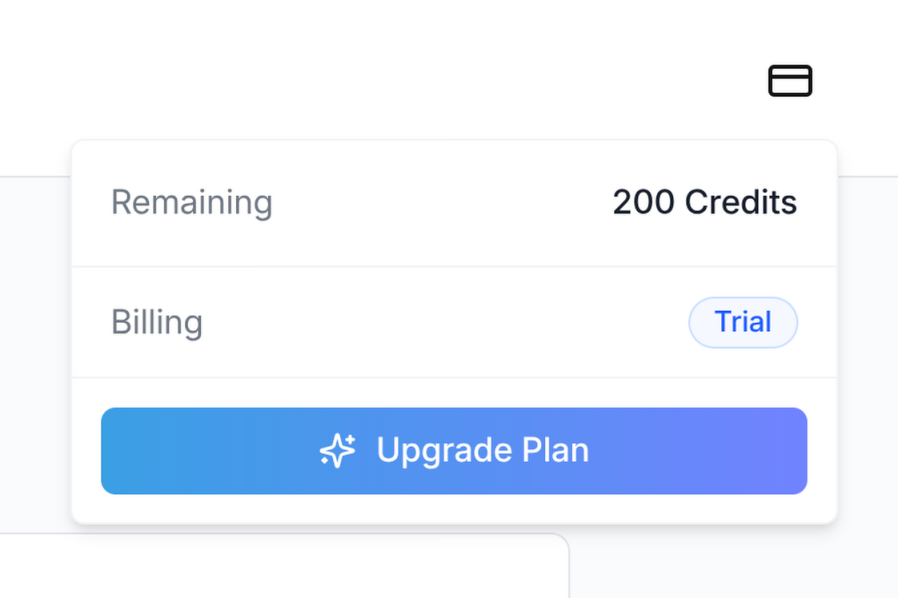
Add the ibl.ai credit balance widget to your app's top navigation. The
widget shows the user's remaining credits, current plan, and exposes the
upgrade / add-credits / manage-billing flows. It uses Stripe under the
hood and is rendered by the SDK — do not build a custom version.
Do NOT add custom styles, colors, or CSS overrides to the
`<CreditBalance>` component. It ships with its own styling, including
the trigger icon, the dropdown panel, and the upgrade/add-credits
buttons. Wrapping it, restyling it, or swapping the icon will break the
upgrade flow and visual consistency across ibl.ai apps.
The widget MUST follow the canonical integration:
- **Import path**: `@iblai/iblai-js/web-containers` (the
framework-agnostic bundle — NOT `/next`, NOT `/sso`)
- **`redirectUrl`**: `window.location.origin` (the Stripe checkout return
URL — origin only, never `.href` or a path)
- **`enabled`**: explicit `true`
- **No `className`**: do not pass a `className` prop unless you have a
layout reason. Never use it to swap the icon, change colors, or
override the size
---
## Visual spec
| Property | Value |
|---|---|
| Trigger | Icon-only button (Lucide `CreditCard`) provided by the SDK |
| Trigger size | `h-5 w-5` icon inside a `ghost` icon button |
| Status dot | Small colored dot in the top-right of the trigger when balance is low |
| Panel width | `w-[320px]` dropdown |
| Position in navbar | Right side, between the page links and the notification bell |
---
## Prerequisites
- Auth must be set up first (`iblai add auth`)
- Navbar must be in place (`/iblai-navbar`)
- `@iblai/iblai-js` SDK installed
- Tailwind v4 with the SDK `@source` directives configured (see
Step 1 below)
- The tenant must have paywall enabled (`currentTenant.show_paywall === true`).
The widget is a no-op for tenants that don't sell credits.
## What this skill creates
This skill does not generate any new files — it wires
`<CreditBalance>` from the SDK into the existing navbar. It adds:
- A `<CreditBalance>` element inside the navbar's right-side cluster
- The required `@source` directives in `iblai-styles.css` so Tailwind
generates the SDK's internal classes (the trigger icon depends on
this — without it, the icon may render at the wrong size)
- The visibility gate so the widget only renders for users who can act
on it (admins or trial users, on a paywall-enabled tenant)
---
## Step 1 — Confirm Tailwind scans both SDK source folders
The `<CreditBalance>` icon and panel use Tailwind utility classes
authored inside the SDK's compiled JS. Tailwind v4 will not generate
those classes unless the SDK's `source/` directories are listed as
`@source`.
Open `app/iblai-styles.css` (or `app/globals.css` if styles live there)
and ensure BOTH directives are present:
```css
@source "../lib/iblai/sdk/web-containers/source";
@source "../lib/iblai/sdk/web-containers/source/next";
```
If you are scanning `node_modules` directly instead of the `lib/iblai/sdk`
symlink, the equivalent is:
```css
@source "../node_modules/@iblai/iblai-js/dist/web-containers/source";
@source "../node_modules/@iblai/iblai-js/dist/web-containers/source/next";
```
Both lines are required. The `source/next` path covers the next-bundle
classes; the SDK's icon and dropdown rely on classes from across the
whole bundle. If only one is scanned, the credit icon may render at an
unexpected size or without its layout utilities.
After editing, restart the dev server. Verify the build picks up the
classes:
```bash
rm -rf .next && pnpm build
grep -oE 'h-5\\!|w-5\\!' .next/static/chunks/*.css | head
```
You should see `h-5\!` and `w-5\!` in the generated CSS.
---
## Step 2 — Import the component
Inside your navbar component (`components/navbar/nav-bar.tsx` or
equivalent), import `CreditBalance` from the framework-agnostic bundle:
```tsx
import {
CreditBalance,
NotificationDropdown,
} from '@iblai/iblai-js/web-containers';
```
Do NOT import from `@iblai/iblai-js/web-containers/next`. The credit
component does not require Next.js primitives, and the `/next` bundle
re-exports a smaller surface — keeping all SDK widgets on the same
import path simplifies the component graph.
---
## Step 3 — Render the widget
Place `<CreditBalance>` inside the navbar's right-side cluster, before
the notification bell:
```tsx
<div className="flex items-center space-x-4">
{showCreditBalance &&
currentTenant?.show_paywall &&
canViewCredits &&
isLoggedIn && (
<CreditBalance
tenant={tenantKey}
enabled={true}
redirectUrl={window.location.origin}
mainPlatformKey={config.mainTenantKey()}
currentUserEmail={email}
username={username}
/>
)}
<NotificationDropdown
org={tenantKey}
userId={username ?? ''}
isAdmin={isAdmin}
onViewNotifications={handleViewNotifications}
/>
{/* Profile dropdown last */}
</div>
```
### Required props
| Prop | Source | Notes |
|---|---|---|
| `tenant` | Resolved tenant key (e.g. from `resolveAppTenant()`) | The tenant the user is acting under — billing is per-tenant |
| `enabled` | Always `true` | The component itself returns `null` if `enabled` is false; pass `true` so it renders when the gating below passes |
| `redirectUrl` | `window.location.origin` | Stripe checkout returns to this URL after success/cancel. Always use `origin` (not `href` or a path) so refreshes from Stripe land on a stable route |
| `mainPlatformKey` | `config.mainTenantKey()` | The platform key from `NEXT_PUBLIC_MAIN_TENANT_KEY` — used by the upgrade flow to attribute revenue to the correct platform |
| `currentUserEmail` | From `userData` in localStorage (`user_email` / `email`) | Stripe Checkout pre-fills with this |
| `username` | From `userData` (`user_nicename` / `username`) | Used for the Stripe customer portal `userId` |
### Optional props
| Prop | Default | Notes |
|---|---|---|
| `className` | (none) | Reserved for layout adjustments only. Do NOT use it to override the icon, colors, or sizing |
| `enabled` | `true` | Pass `false` to programmatically hide the widget without unmounting it (rarely useful — prefer the gating below) |
---
## Step 4 — Gating
The widget MUST only render when ALL of the following are true:
1. **The tenant sells credits** — `currentTenant?.show_paywall === true`.
Tenants without paywall enabled return no billing info; rendering the
widget there shows a permanent error state.
2. **The user can act on credits** — typically `isAdmin || userOnFreeTrial`.
Regular learners on a paid plan generally cannot top up the
organization's balance, so showing them the widget is misleading.
Substitute the equivalent check for your app's role model.
3. **The user is logged in** — the widget hits authenticated billing
endpoints. Render only after auth has resolved (e.g. when
`tenantKey`, `username`, and `email` are all populated from
localStorage).
Pull these flags into the navbar component (or its parent layout) and
combine them in the JSX guard shown in Step 3. Do not gate solely on
`enabled` — the SDK's `enabled` prop hides the rendered output but does
not skip the billing query, so a real visibility gate at the JSX level
is required.
---
## Step 5 — Verify
Start the dev server, log in, and confirm:
1. The credit-card trigger icon appears between the navigation links
and the notification bell on a paywall-enabled tenant.
2. Clicking the trigger opens the dropdown panel showing remaining
credits, consumed credits, reset date (if applicable), and a
billing pill.
3. On a Free plan, the panel shows an "Upgrade Plan" CTA. After
adding a payment method, the buttons switch to "Manage Usage" and
"Add Credits".
4. Clicking the upgrade or manage-billing button redirects to Stripe
Checkout / the Stripe customer portal and returns to your app's
origin on completion.
If the icon renders larger than `h-5 w-5` or without its border-radius,
the SDK source folders are not being scanned — go back to Step 1.
---
## Common mistakes
- **Wrong import path**: importing from `@iblai/iblai-js/web-containers/next`
works for some bundles but ties the credit widget to Next-specific
primitives unnecessarily. Use the plain `web-containers` path.
- **`redirectUrl={window.location.href}`**: when Stripe Checkout
succeeds, it redirects back to this URL. Using `.href` re-opens
whatever modal or query state was active when the upgrade started,
which can re-trigger the upgrade flow. Always use `.origin`.
- **Missing `@source "../.../source/next"`**: the most common cause of
"the icon looks wrong" — Tailwind isn't generating the SDK's classes
because only one of the two source paths is scanned.
- **Adding a `className` to swap icons or colors**: don't. The component
is a contract; downstream apps depend on it being visually consistent.
- **Rendering on tenants without paywall**: the panel will show
"Unable to load credit balance" indefinitely. Always gate on
`currentTenant?.show_paywall`.
- **Rendering for non-admin / non-trial users**: they cannot top up
the org's balance, so the panel's actions are no-ops. Hide the
widget for them.
---
## SDK component reference
For the full prop surface and the underlying billing data shape, see:
- `CreditBalance` — `@iblai/iblai-js/web-containers`
- props: `tenant`, `username`, `mainPlatformKey`, `currentUserEmail`,
`redirectUrl`, `className?`, `enabled?`
- Billing data is fetched via `useGetAccountBillingInfoQuery` from the
data layer — no manual data fetching is required
- Stripe portal sessions are created via
`useCreateStripeCustomerPortalMutation`Related Skills
iblai-workflow
Add workflow builder components to your Next.js app
iblai-security-recon
Perform structured reconnaissance and attack surface enumeration for authorized penetration tests, CTF challenges, and bug bounty programs. Use when the user mentions 'recon,' 'reconnaissance,' 'enumerate,' 'attack surface,' 'subdomain enumeration,' 'port scan,' 'fingerprint,' 'asset discovery,' or needs to map a target's external footprint.
iblai-security-prompt-injection
Audit applications for AI prompt injection, agent security, and LLM permission boundary vulnerabilities. Use when the user mentions 'prompt injection,' 'LLM security,' 'AI security,' 'jailbreak,' 'indirect prompt injection,' 'prompt leaking,' 'AI red team,' 'LLM vulnerabilities,' 'AI input validation,' 'system prompt extraction,' 'agent security,' 'MCP security,' 'AI permissions,' 'AI privilege escalation,' or needs to secure any application with AI features, AI agents, or LLM integrations.
iblai-security-owasp-audit
Audit application source code against the OWASP Top 10 vulnerability categories. Use when the user mentions 'OWASP,' 'security audit,' 'code security review,' 'vulnerability audit,' 'find vulnerabilities,' 'secure code review,' 'security review,' or wants to check their codebase for common security weaknesses.
iblai-security-osint-recon
Gather and correlate open source intelligence from public sources for authorized investigations, threat intelligence, and attack surface assessment. Use when the user mentions 'OSINT,' 'open source intelligence,' 'digital footprint,' 'public records,' 'threat intelligence,' 'investigate a domain,' or needs to research a target using publicly available data.
iblai-security-incident-triage
Guide rapid triage and initial response to security incidents following NIST SP 800-61 methodology. Use when the user mentions 'incident response,' 'security incident,' 'triage,' 'we've been hacked,' 'breach,' 'compromised,' 'malware detected,' 'suspicious activity,' 'IOC,' 'indicators of compromise,' or needs help handling a security event.
iblai-security-disk-forensics
Analyze disk images and file systems for digital evidence recovery in forensic investigations and CTF challenges. Use when the user mentions 'disk forensics,' 'forensic analysis,' 'disk image,' 'file carving,' 'deleted files,' 'evidence recovery,' 'autopsy,' 'sleuthkit,' or needs to examine a forensic image.
iblai-security-dependency-audit
Audit project dependencies, frameworks, languages, and dev tools for known vulnerabilities, CVEs, and security anti-patterns. Use when the user mentions 'dependency audit,' 'npm audit,' 'CVE,' 'vulnerable packages,' 'supply chain security,' 'outdated dependencies,' 'known vulnerabilities,' 'security advisory,' 'package security,' 'framework vulnerability,' 'is this package safe,' or needs to check whether their stack has known security issues.
iblai-security-cloud-audit
Audit cloud infrastructure (AWS, GCP, Azure) for misconfigurations, excessive permissions, and security gaps. Use when the user mentions 'cloud security,' 'cloud audit,' 'AWS security,' 'GCP security,' 'Azure security,' 'IAM audit,' 'S3 bucket,' 'cloud misconfiguration,' 'cloud hardening,' or needs to review cloud infrastructure security.
iblai-readme
Write or refresh the README.md
iblai-rbac
Use when building, auditing, or extending ibl.ai role-based access control — default roles seeded by the platform, the action-definitions endpoint, and the SDK components (Admin, RolesTab, PoliciesTab) that render the Roles + Policies management UI. For agent-scoped sharing (editor / chat roles on a single mentor) see /iblai-agent-access; for mounting the host Account modal see /iblai-account.
iblai-project
Add the in-process Projects surface (project landing page — chat input + project files + instructions + assigned agents) to a Next.js app